Transitioning to the cloud is more than a technical shift; it's a fundamental business evolution that promises agility, scalability, and innovation. However, without a meticulous plan, this journey can be fraught with unforeseen costs, security vulnerabilities, and operational disruptions. A well-structured cloud migration checklist acts as your strategic roadmap, guiding every phase from initial assessment to post-migration optimization. It transforms a complex, multi-faceted project into a manageable series of actionable steps. This ensures every dependency is mapped, every security protocol is in place, and every dollar is accounted for.
This guide provides that critical framework. We will move beyond generic advice to offer a specific, battle-tested checklist for a successful migration. Each step is designed to give your business, whether it's a multi-location franchise or a compliance-driven healthcare practice, the clarity and control needed to de-risk the process.
From defining your core strategy and handling sensitive data to planning the final cutover, this comprehensive list covers the essential milestones. Following this checklist will help you avoid common pitfalls and unlock the full operational and financial potential of your cloud investment. Let's begin building your migration plan.
1. Assessment and Inventory of Current Infrastructure
Before you can move to the cloud, you must first understand what you have. A comprehensive assessment and inventory of your current IT infrastructure is the foundational first step of any successful cloud migration checklist. This process involves a meticulous cataloging of every asset, application, and dependency within your existing on-premises environment.
Think of it as creating a detailed blueprint of your IT landscape. This includes servers, software licenses, databases, network configurations, and crucially, the interdependencies between them. A thorough inventory prevents surprises down the line, such as orphaned applications or unforeseen compatibility issues that could derail your migration project. For example, Capital One's legendary cloud-first strategy began with an exhaustive assessment that mapped every single application and its dependencies, ensuring a smooth, calculated transition.
Why This Step is Crucial
Skipping or rushing this phase is a common cause of migration failure. A detailed inventory provides the critical data needed to:
- Define Scope: Accurately determine which applications and workloads are candidates for migration.
- Identify Dependencies: Uncover hidden connections between systems that must be addressed to avoid breaking business processes.
- Estimate Costs: Formulate a realistic budget by understanding the resources required for each workload in the cloud.
- Ensure Compliance: Document all regulatory and compliance requirements (like HIPAA for healthcare) tied to specific data and applications upfront.
The following decision tree illustrates how the scale and compliance needs of your business can guide your initial assessment strategy.
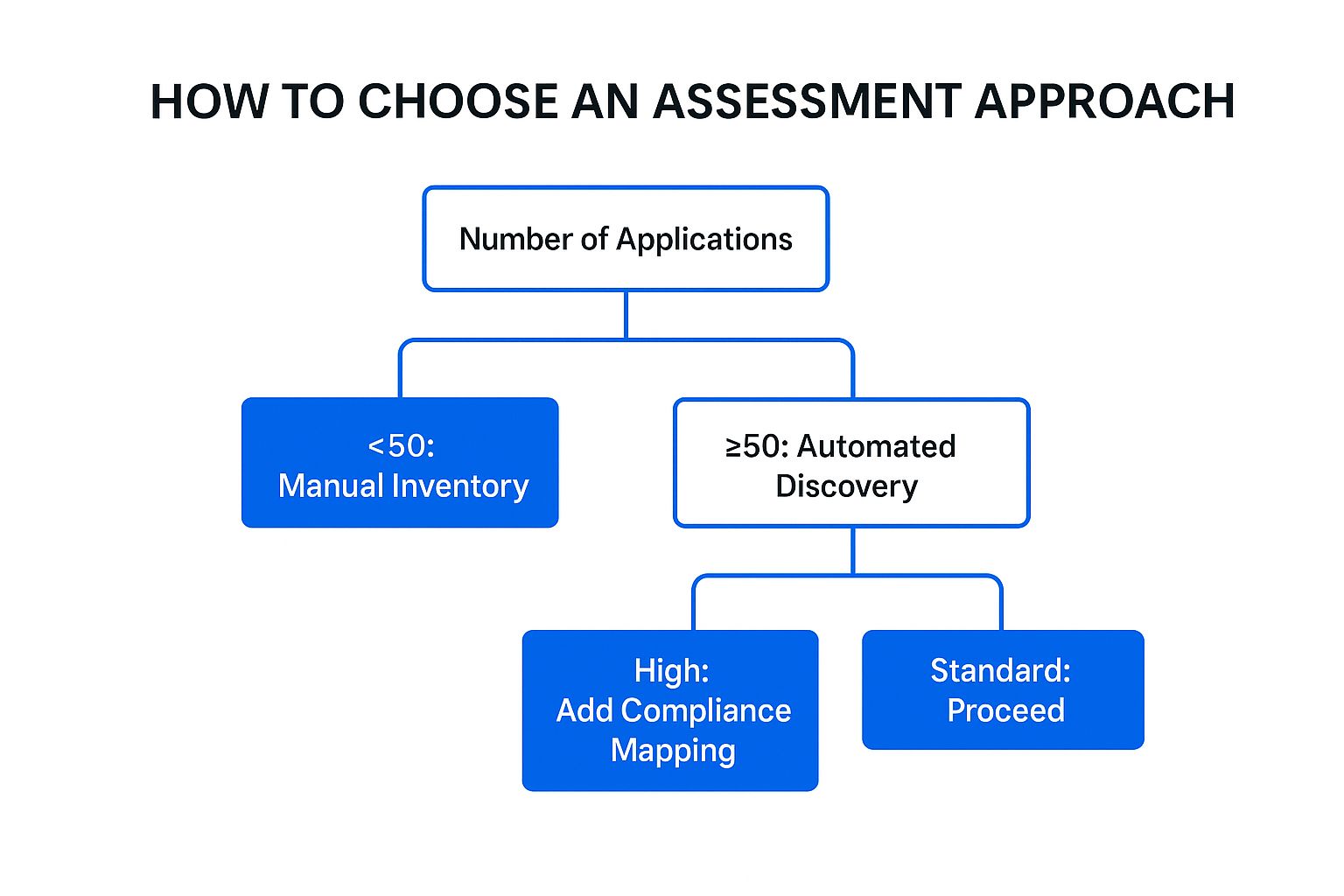
This flowchart highlights that while a small business can start with a manual inventory, larger or more complex environments benefit significantly from automated tools and a formal compliance mapping process.
Actionable Tips for a Successful Assessment
To execute this step effectively, involve application owners and business stakeholders from the beginning. Their input is invaluable for understanding how applications are used and their importance to the business.
- Use Automated Tools: For environments with 50 or more applications, leverage discovery tools like AWS Application Discovery Service or Azure Migrate. These tools automatically scan your environment to map servers, performance data, and dependencies, saving hundreds of hours of manual effort.
- Create a Detailed Asset Register: Go beyond just listing servers. Your inventory should be a rich database that includes application owners, business criticality ratings, performance metrics (CPU, RAM, storage), and associated compliance constraints.
- Document Everything: Meticulously record all findings. This documentation becomes the master guide for your entire cloud migration strategy, informing which of the "6 R's" of migration (Rehost, Replatform, Repurchase, Refactor, Retire, Retain) is appropriate for each application.
2. Define Migration Strategy and Approach
With a detailed inventory in hand, the next critical step in your cloud migration checklist is to define a clear, overarching strategy. This involves determining the best migration path for each application and workload based on business goals, technical constraints, and desired outcomes. You are not just moving data; you are making strategic decisions that will impact your organization's agility, cost, and innovation for years to come.
This strategic phase is centered around the "6 R's" of migration: Rehost, Replatform, Repurchase, Refactor, Retire, and Retain. This framework, popularized by AWS and Gartner, provides a vocabulary for deciding the fate of every component in your IT portfolio. For example, Dropbox executed a complex strategy that combined replatforming key services for better performance while refactoring others to build its own highly optimized infrastructure, demonstrating how different approaches can be blended to meet specific business needs.
Why This Step is Crucial
A well-defined strategy transforms your migration from a chaotic IT project into a calculated business initiative. It provides a roadmap that aligns technical efforts with strategic objectives. This planning is essential to:
- Optimize ROI: Match the most cost-effective migration approach to each application’s value.
- Manage Risk: Start with low-risk migrations (like rehosting non-critical apps) to build momentum and learn valuable lessons.
- Align with Business Goals: Ensure the migration supports long-term objectives, whether that's reducing costs, increasing agility, or enabling new digital services.
- Set Realistic Timelines: Break the migration into manageable phases with clear, achievable milestones.
For those looking to understand the technical nuances of different cloud platforms to better inform their choices, exploring a dedicated resource can provide deeper knowledge. For deeper technical insights into specific cloud platforms that can inform your migration strategy, exploring a platform-specific blog can be highly beneficial. You can find excellent articles and tutorials in resources like Azure Development Insights.
Actionable Tips for a Successful Strategy
Your migration strategy should be a living document, adaptable to new information and lessons learned throughout the process.
- Start with a Pilot Program: Select a small group of non-critical applications to test your chosen strategies. This validates your approach, tools, and team skills in a low-risk environment before tackling mission-critical workloads.
- Map Each Application to one of the 6 R's: Methodically go through your inventory and assign a strategy (e.g., Rehost, Refactor) to every application. Justify each decision based on business criticality, technical complexity, and cost.
- Prioritize Based on Business Impact: Don't just start with the easiest applications. Create a migration sequence that balances quick wins with high-impact projects to demonstrate value to stakeholders early and often. This keeps momentum and support high.
3. Security and Compliance Planning
Security and compliance are not afterthoughts; they are integral components that must be woven into your cloud migration strategy from the very beginning. This step involves developing a comprehensive security framework and ensuring that your cloud environment will meet all relevant regulatory standards. You must adapt your existing security controls for the cloud and guarantee data protection remains robust throughout the entire transition.

The cloud operates on a shared responsibility model, meaning the cloud provider (like AWS or Azure) secures the cloud's infrastructure, but you are responsible for securing what is in the cloud. For instance, healthcare organizations migrating to the cloud use services like Azure's HIPAA-compliant offerings to meet regulatory mandates, while financial firms implement zero-trust architectures to protect sensitive data. Proactive planning ensures you build a secure and compliant foundation, not just a functional one.
Why This Step is Crucial
Neglecting security planning early on can lead to catastrophic data breaches, non-compliance penalties, and significant reputational damage. A proactive security and compliance plan is essential to:
- Mitigate Risks: Identify and address potential security vulnerabilities before they can be exploited in the new environment.
- Maintain Compliance: Ensure your cloud architecture adheres to industry-specific regulations like HIPAA, PCI DSS, or FedRAMP.
- Build Trust: Demonstrate a commitment to data protection, which is critical for maintaining customer and stakeholder confidence.
- Prevent Costly Rework: Integrating security controls from the start is far more efficient and less expensive than retrofitting them after migration.
Actionable Tips for Security and Compliance Planning
A robust security plan requires a multi-layered approach that addresses people, processes, and technology. Your plan should be a core part of your cloud migration checklist.
- Implement Least-Privilege Access: From day one, grant users and systems only the minimum permissions necessary to perform their functions. Use Identity and Access Management (IAM) policies to enforce these controls strictly.
- Use Cloud-Native Security Services: Leverage tools provided by your cloud vendor, such as AWS Shield for DDoS protection or Azure Sentinel for security information and event management (SIEM). These services are designed to integrate seamlessly with the cloud environment.
- Establish Data Classification: Classify your data based on sensitivity (e.g., public, internal, confidential, restricted). This allows you to apply appropriate encryption, access controls, and retention policies to protect your most critical assets. A complete security audit checklist can help formalize this process, learn more about creating an IT security audit checklist on infotech.net.
- Conduct Regular Assessments: Continuously assess your cloud environment through vulnerability scanning, penetration testing, and configuration reviews to identify and remediate security gaps.
4. Data Migration and Backup Strategy
After choosing your cloud provider and migration strategy, the next critical phase involves moving your most valuable asset: your data. A robust data migration and backup plan is essential for securely transferring data from on-premises systems to cloud storage. This step requires meticulous planning and execution to ensure data integrity, minimize downtime, and prevent data loss during the transition.
Think of this as the digital equivalent of moving a priceless archive. It's not just about transport; it's about cataloging, securing, and validating every piece. For instance, Pinterest successfully migrated over 50 petabytes of data to AWS by leveraging tools like AWS DataSync and Snowball for secure, high-speed transfer. Similarly, Slack achieved a real-time data migration with zero downtime by using sophisticated database replication techniques, ensuring their service remained available to millions of users throughout the process.
Why This Step is Crucial
A flawed data migration can have catastrophic consequences, from corrupted databases to extended service outages and regulatory fines. A well-defined strategy is essential to:
- Ensure Data Integrity: Guarantee that data arrives in the cloud exactly as it was on-premises, without corruption or loss.
- Minimize Downtime: Plan the cutover process to reduce the impact on business operations, aiming for near-zero downtime for critical applications.
- Maintain Security and Compliance: Protect data in transit and at rest, adhering to regulations like GDPR or HIPAA throughout the migration.
- Validate Success: Implement procedures to confirm that all data has been transferred correctly and is fully accessible in the new cloud environment.
This video from the AWS Database Migration Service team provides deeper insight into the complexities and solutions involved in migrating databases to the cloud.
Actionable Tips for a Successful Data Migration
To execute a seamless data migration, focus on precision, security, and validation. Integrating backup procedures from the start is also key. For further guidance, you can explore some of the best practices for secure data backup.
- Use Purpose-Built Transfer Tools: For large datasets, leverage services like AWS DataSync, Azure Data Box, or Google Transfer Appliance. These tools are designed to move petabytes of data more efficiently and securely than standard internet transfers.
- Implement Checksum Validation: Use checksums (like MD5 or SHA-256) to create a digital fingerprint of your data before and after transfer. Comparing these fingerprints verifies that the data has not been altered or corrupted in transit.
- Plan for Incremental Synchronization: To minimize the final cutover window, perform an initial bulk data transfer and then use ongoing, incremental synchronization to keep the cloud data updated. This dramatically reduces the amount of data that needs to be moved during the final migration event.
- Test Restore Procedures: Before decommissioning your on-premises systems, rigorously test your cloud backup and restore procedures. A backup is only useful if you can successfully restore from it.
5. Network Architecture and Connectivity Design
Your cloud migration is only as robust as the network connecting your users and on-premises systems to the cloud. Designing a resilient and secure network architecture is a non-negotiable step in your cloud migration checklist. This stage involves creating the digital highways that will carry your data, ensuring they are fast, secure, and reliable enough to support business operations.
Think of this as designing the circulatory system for your new hybrid environment. It includes setting up secure connections like VPNs or dedicated lines (e.g., AWS Direct Connect), configuring virtual private clouds (VPCs), and implementing load balancers to distribute traffic efficiently. BMW successfully uses AWS Direct Connect to link its global manufacturing facilities, ensuring its factory networks have the low-latency, high-bandwidth connection needed for modern production demands.
Why This Step is Crucial
A poorly designed network can lead to crippling latency, security vulnerabilities, and unexpected costs, completely undermining the benefits of moving to the cloud. A solid network design is critical to:
- Ensure Performance: Guarantee low latency and high throughput for applications, which is essential for user experience and productivity.
- Strengthen Security: Implement security groups, firewalls, and private connections to protect data both in transit and within the cloud.
- Enable Scalability: Build a network that can grow with your business without requiring a complete overhaul.
- Control Costs: Optimize data transfer paths and avoid costly network egress fees by planning your architecture effectively.
A well-architected network is the backbone of a successful hybrid cloud strategy, ensuring seamless communication between your existing infrastructure and new cloud resources.
Actionable Tips for a Successful Network Design
To avoid performance bottlenecks and security gaps, a proactive and detailed approach to network planning is essential. This involves more than just "lifting and shifting" your current network topology to the cloud.
- Plan Your IP Address Scheme Carefully: Design your IP addressing (CIDR blocks) for your VPCs to prevent overlaps with your on-premises networks. This avoids complex routing issues and future conflicts as you expand.
- Design for High Availability: Use multiple Availability Zones (AZs) for critical workloads. Distribute your subnets and resources across different AZs to build in redundancy and ensure your applications can withstand a data center failure.
- Implement Network Monitoring from Day One: Use tools like Amazon CloudWatch or Azure Monitor to track network traffic, latency, and packet loss. Setting up alerts for anomalies helps you proactively address issues before they impact users. Proper network capacity planning is fundamental to this process.
6. Application Testing and Validation
Migrating applications is only half the battle; ensuring they work flawlessly in their new cloud environment is what defines success. Comprehensive application testing and validation is the critical quality assurance phase of your cloud migration checklist. It involves rigorously evaluating every migrated application to confirm its functionality, performance, and security meet or exceed expectations before going live.
This step moves beyond simple "does it turn on" checks. It's an in-depth process of simulating real-world usage, from user interactions to high-traffic loads and potential security threats. For instance, Netflix's famous "Chaos Engineering" practice intentionally injects failures into its AWS environment to proactively test resilience. This rigorous validation ensures that what worked on-premises performs reliably and securely at scale in the cloud.
Why This Step is Crucial
Cutting corners on testing can lead to disastrous post-launch outcomes, including application downtime, data corruption, security vulnerabilities, and a poor user experience that erodes customer trust. A methodical testing strategy is essential to:
- Ensure Functionality: Confirm that all application features and business logic operate as intended after migration.
- Validate Performance: Verify that the application meets performance benchmarks for response time, throughput, and scalability under expected load.
- Strengthen Security: Identify and remediate any new vulnerabilities or misconfigurations introduced by the cloud environment.
- Confirm Business Continuity: Test failover and disaster recovery mechanisms to ensure your application can withstand infrastructure failures.
Actionable Tips for Successful Testing and Validation
To execute this step effectively, treat testing as a distinct project phase with dedicated resources, not an afterthought. Involve business users early for user acceptance testing (UAT) to get real-world feedback.
- Automate Wherever Possible: Implement an automated testing pipeline using tools like Selenium for functional testing or JMeter for load testing. Automation enables continuous validation and catches regressions quickly, which is vital in a dynamic cloud environment.
- Use Cloud-Native Testing Tools: Leverage services like AWS Device Farm for mobile testing or Azure Load Testing for performance validation. These tools integrate seamlessly with the cloud platform, providing more accurate and scalable results than on-premises equivalents.
- Test for Failure: Don't just test for success scenarios. Actively simulate a range of failures, such as a database outage or a regional service disruption, to validate your disaster recovery and high-availability architecture. This is a core principle of Google's Site Reliability Engineering (SRE) approach.
- Conduct Phased Rollouts: Instead of a big-bang launch, use deployment strategies like canary releases or blue-green deployments. This allows you to route a small percentage of live traffic to the new cloud environment, monitor its performance closely, and roll back instantly if issues arise.
7. Go-Live and Cutover Planning
The go-live and cutover phase is the moment of truth in your cloud migration checklist. This is where all the planning, testing, and preparation culminate in the final switch from your on-premises environment to the new cloud infrastructure. It requires a meticulously orchestrated plan to transition services, redirect traffic, and begin full-scale cloud operations with minimal disruption to your business.

Think of it as a well-rehearsed performance. A successful cutover isn't about improvisation; it's about executing a detailed, minute-by-minute script. For instance, Maersk managed a highly complex global shipping system migration by coordinating teams across time zones, ensuring that when one system went live in the cloud, all dependent services were ready, resulting in near-zero service interruption.
Why This Step is Crucial
A poorly managed cutover can lead to extended downtime, data loss, and a significant loss of customer trust, undoing months of hard work. Proper planning is essential to:
- Minimize Business Disruption: Schedule the cutover during low-traffic periods (like weekends or overnight) to reduce the impact on users and revenue.
- Ensure Data Integrity: Implement final data synchronization and validation checks to guarantee no information is lost or corrupted during the transition.
- Provide a Clear Rollback Path: A well-defined rollback plan is your safety net, allowing you to quickly revert to the old system if critical, unforeseen issues arise.
- Align Stakeholders: Keep all stakeholders, from technical teams to business leaders and end-users, informed with clear, timely communication.
Actionable Tips for a Successful Go-Live
Execution excellence is the goal. This means leaving nothing to chance and preparing for every contingency. Your cutover plan should be one of the most detailed documents in your entire migration project.
- Conduct Multiple Dress Rehearsals: Run at least one full "dress rehearsal" of the cutover process in a pre-production environment. This helps identify gaps in the plan, validates time estimates, and builds team confidence.
- Prepare Detailed Communication Templates: Draft pre-approved communication for various scenarios: success, delays, or rollback. Have templates ready for internal teams, executive leadership, and customers to ensure fast, consistent messaging.
- Create a Go/No-Go Checklist: Before starting the cutover, run through a final go/no-go checklist. This should include final sign-offs from key stakeholders, confirmation that all prerequisite tasks are complete, and a final check on system health.
- Establish a "War Room": Designate a central command center (physical or virtual) where all key personnel, including senior technical staff and decision-makers, are present and can communicate in real-time throughout the cutover window.
8. Post-Migration Optimization and Monitoring
Crossing the finish line of migration is not the end of the journey; it's the beginning of a new operational phase. Post-migration optimization and monitoring are the ongoing activities required to ensure your cloud environment runs efficiently, securely, and cost-effectively. This step involves continuously fine-tuning resources, tracking performance, and governing your cloud spending to maximize your return on investment.
Think of it as tending to a newly planted garden. The initial work is done, but ongoing care is essential for it to flourish. This means right-sizing virtual machines, shutting down idle resources, and leveraging cloud-native tools to automate performance and security checks. For example, Lyft famously saves over $100 million annually by continuously optimizing its AWS usage, a testament to the power of diligent post-migration management. This process is a cornerstone of any effective cloud migration checklist.
Why This Step is Crucial
Neglecting post-migration optimization can quickly lead to spiraling costs and performance bottlenecks, negating the benefits you sought from the cloud in the first place. A proactive monitoring and optimization strategy allows you to:
- Control Costs: Prevent "cloud sprawl" and ensure you only pay for the resources you truly need.
- Enhance Performance: Proactively identify and resolve performance issues before they impact end-users and business operations.
- Strengthen Security: Continuously monitor for threats and misconfigurations, maintaining a robust security posture.
- Drive Continuous Improvement: Establish a culture of efficiency by creating a feedback loop for ongoing enhancements, often managed by a Cloud Center of Excellence (CCoE).
Actionable Tips for a Successful Optimization Strategy
To make optimization a sustainable practice, integrate it into your regular IT operations from day one. Involve your finance and operations teams to build a comprehensive FinOps (Financial Operations) culture.
- Implement Robust Tagging: Use a consistent tagging strategy for all cloud resources. This allows you to accurately track costs by department, project, or application, making cost allocation and accountability straightforward.
- Automate Cost and Performance Alerts: Configure automated alerts using tools like Google Cloud Operations Suite or AWS Cost Explorer. Set up budget alerts to be notified when spending exceeds a predefined threshold and performance alerts for metrics like high CPU usage.
- Schedule Regular Optimization Reviews: Dedicate time each month or quarter to review resource utilization reports. Look for oversized instances, underused storage, and idle resources that can be downsized or terminated to reduce waste.
- Leverage Cloud-Native Automation: Use features like AWS Auto Scaling or Azure Autoscale to automatically adjust resource capacity based on real-time demand, ensuring optimal performance without over-provisioning.
Cloud Migration Checklist: 8 Key Steps Comparison
| Item | Implementation Complexity 🔄 | Resource Requirements ⚡ | Expected Outcomes 📊 | Ideal Use Cases 💡 | Key Advantages ⭐ |
|---|---|---|---|---|---|
| Assessment and Inventory of Current Infrastructure | High – requires specialized tools and cross-team coordination | Moderate to high – experts, automated tools | Accurate environment inventory, cost baseline, risk identification | Large, complex environments with many applications and dependencies | Prevents migration surprises, early optimization, security insights |
| Define Migration Strategy and Approach | Medium – involves strategic planning and stakeholder alignment | Moderate – technical and business expertise | Clear roadmap, optimized cost/performance, aligned teams | Organizations needing structured migration paths and phased execution | Reduces uncertainty, aligns with business goals, enables parallel work |
| Security and Compliance Planning | High – complex security frameworks and regulatory mapping | High – security tools, skilled personnel | Improved security posture, compliance adherence | Regulated industries, data-sensitive migrations | Maintains compliance, scalable security, disaster recovery readiness |
| Data Migration and Backup Strategy | Medium to high – data transfer logistics and validation | High – backup systems, transfer tools, bandwidth | Secure, validated data transfer with minimal downtime | Large volumes of critical data with strict integrity requirements | Scalability, cost-efficiency, global replication, disaster recovery |
| Network Architecture and Connectivity Design | High – intricate network setups and hybrid connectivity | High – network specialists, connectivity services | Secure, performant hybrid cloud connectivity | Hybrid cloud environments with complex network demands | Secure hybrid connectivity, scalable bandwidth, global reach |
| Application Testing and Validation | Medium to high – extensive testing types and environments | High – test tools, environments, automation | Production-ready applications with verified performance/security | Critical apps requiring high reliability before cutover | Early issue detection, performance validation, security assurance |
| Go-Live and Cutover Planning | High – detailed coordination and contingency management | Moderate – cross-team resources, communication tools | Smooth cutover, minimized downtime, rapid rollback | Final migration phase requiring minimal disruption | Minimizes downtime, clear roles, quick issue resolution |
| Post-Migration Optimization and Monitoring | Medium – continuous monitoring and optimization processes | Moderate to high – monitoring tools, experts | Cost savings, improved performance, proactive issue detection | Long-term cloud operations focused on efficiency and improvement | Cost efficiency, performance gains, operational visibility |
From Checklist to Cloud Success: Your Next Steps
Navigating the journey to the cloud is a significant undertaking, but it’s a strategic imperative for modern businesses seeking agility, security, and scalability. This comprehensive cloud migration checklist has provided a detailed, eight-stage roadmap, moving far beyond generic advice to offer actionable insights for each critical phase. From the initial, meticulous assessment of your current infrastructure to the final, ongoing process of post-migration optimization, each step is an essential building block for a successful transition.
The true value of this framework lies in its holistic approach. It emphasizes that a successful migration isn't just about moving data and applications; it’s about strategically re-architecting your operations for a new environment. By meticulously planning your security posture, defining a robust data migration strategy, and rigorously testing your applications, you transform what could be a high-risk initiative into a predictable, controlled process. This diligence is what separates a chaotic, budget-breaking migration from a smooth, value-driven one.
The Real Work Begins Now
Completing the items on this checklist marks a major milestone, but it is not the finish line. Instead, it signifies the beginning of a new operational model for your organization. The cloud is not a static destination; it is a dynamic platform that requires continuous attention to unlock its full potential. The final stage, "Post-Migration Optimization and Monitoring," is arguably the most crucial for long-term ROI.
Your immediate next steps should involve:
- Reviewing Your Performance: Immediately begin tracking the performance metrics and KPIs you established during the planning phase. Are your applications performing as expected? Are your cloud costs in line with your budget projections?
- Engaging Your Team: Gather feedback from your end-users and technical teams. Their real-world experience is invaluable for identifying unforeseen issues and opportunities for improvement.
- Implementing a Governance Framework: Solidify your cloud governance policies. This includes managing access controls, enforcing security protocols, and establishing clear guidelines for resource provisioning to prevent cloud sprawl and control costs.
Mastering this process ensures your cloud environment doesn't just function; it thrives. It becomes a strategic asset that fuels innovation, enhances security for sensitive data in sectors like healthcare and law, and provides the operational resilience needed for manufacturing and logistics. You have built the foundation; now is the time to build upon it.
Ready to turn your checklist into a strategic victory but need expert guidance to navigate the complexities? The Utah-based team at InfoTech Enterprise Solutions specializes in executing flawless cloud migrations for businesses just like yours. We manage every step, from initial assessment and compliance planning to ongoing optimization, so you can focus on what you do best. Contact InfoTech Enterprise Solutions today to ensure your cloud journey is a resounding success.


Leave a Reply