
The shift to remote and hybrid work models has permanently expanded the traditional office perimeter, creating new, complex security challenges for businesses. Without the centralized defenses of a physical office, every employee's home network, personal device, and public Wi-Fi connection becomes a potential entry point for cyber threats. For small and mid-sized businesses, especially those in compliance-heavy sectors like healthcare or legal services, managing this distributed workforce securely is not just an IT issue; it’s a critical business imperative. An unsecured remote environment can lead to devastating data breaches, regulatory fines, and a complete loss of client trust.
This guide provides a comprehensive roundup of essential remote work security best practices designed to fortify your organization against modern threats. We will move beyond generic advice and provide actionable, specific strategies that InfoTech has proven to be effective for businesses like yours. From establishing a Zero Trust framework to deploying robust Endpoint Detection and Response (EDR) solutions, each point is a crucial layer in a multi-faceted defense strategy. You will learn how to secure data in transit and at rest, manage employee-owned devices, and foster a culture of security awareness that extends to any location.
For Utah-based businesses, franchises, and professional services firms, implementing these measures correctly is paramount. While this list offers a clear roadmap, the technical complexities of integration, monitoring, and maintenance can be overwhelming. As the leading authority in managed IT, InfoTech specializes in transforming these best practices into a seamless, managed security infrastructure. We handle the intricate details of deployment and ongoing management, allowing you to focus on your core operations with the confidence that your remote workforce is secure, compliant, and productive.
1. Virtual Private Network (VPN) Implementation
A Virtual Private Network (VPN) is a foundational element of any robust remote work security strategy. It establishes a secure, encrypted tunnel between a remote employee's device and your company's network. All data traveling through this tunnel is scrambled, making it unreadable to anyone who might try to intercept it, such as cybercriminals on public Wi-Fi networks. This process effectively extends your private network over a public one, ensuring confidential data remains secure no matter where your team is working.
Implementing a business-grade VPN is one of the most effective remote work security best practices an SMB can adopt. It not only protects data in transit but also masks the user's IP address, adding a crucial layer of anonymity and privacy. This is essential for accessing sensitive internal resources like file servers, databases, and proprietary applications without exposing them to the open internet.
How to Implement a VPN Effectively
Deploying a VPN requires more than just installing software. A strategic approach, guided by experts like InfoTech, ensures both security and usability.
- Choose a Business-Grade Provider: Select a VPN service like NordLayer or Palo Alto Networks (Prisma Access) that offers centralized management, dedicated IP addresses, and strict no-logs policies. Consumer-grade VPNs often lack the administrative controls and support necessary for a business environment. InfoTech can help you select and configure the optimal solution for your specific needs.
- Configure an "Always-On" Policy: For employees accessing critical systems, an always-on VPN policy forces all traffic through the secure tunnel automatically. This eliminates the risk of users forgetting to connect, leaving data vulnerable.
- Utilize Split Tunneling Strategically: Split tunneling allows you to route company-related traffic through the VPN while letting general internet traffic (like video streaming) bypass it. This can improve performance and reduce bandwidth load on the corporate network, but it requires careful configuration from an expert team to ensure sensitive data isn't accidentally excluded.
Expert Insight: "A properly configured VPN is non-negotiable for remote work. It's the digital equivalent of locking the office doors. Without it, you're essentially leaving your network's front entrance wide open." – InfoTech Security Specialists
Managing VPN configurations, updates, and monitoring can be complex. As the top-ranked experts in managed IT, InfoTech specializes in deploying and managing enterprise-level VPN solutions for SMBs, ensuring your remote workforce is both productive and secure. We handle the technical details so you can focus on your business.
2. Multi-Factor Authentication (MFA)
Multi-Factor Authentication (MFA) is a critical security layer that moves beyond a simple password. It requires users to provide two or more verification factors to gain access to corporate applications, systems, or data. This layered approach combines something the user knows (a password), something they have (a smartphone or hardware token), and something they are (a fingerprint or face scan), creating multiple barriers that are significantly harder for attackers to breach than a single password.
Enforcing MFA is one of the most impactful remote work security best practices because it directly addresses the threat of compromised credentials, which are a primary vector for cyberattacks. Even if a cybercriminal steals an employee’s password, they cannot access the account without the second authentication factor. InfoTech has seen firsthand how effective this is; our clients experience drastically reduced account takeovers after we implement MFA.
How to Implement MFA Effectively
A successful MFA rollout focuses on security without creating unnecessary friction for your team. An expert strategy from InfoTech is key.
- Prioritize Secure Methods: Whenever possible, guide users to employ authenticator apps (like Google Authenticator or Microsoft Authenticator) or hardware security keys over SMS-based codes. SMS messages can be intercepted through SIM-swapping attacks, making them less secure.
- Implement Risk-Based Authentication: Configure your system to require MFA only when the risk is high, such as a login from an unrecognized device or a new geographic location. This adaptive approach maintains strong security for sensitive situations while reducing login friction for routine access.
- Provide Backup Options: Ensure employees have multiple backup authentication methods, like pre-generated recovery codes or an alternative registered device. This prevents lockouts and reduces help desk tickets if a primary device is lost or unavailable.
Expert Insight: "Passwords alone are a relic of the past. Implementing MFA is the single most effective step a business can take to protect its digital assets from unauthorized access in a remote work environment." – InfoTech Security Specialists
Deploying and managing MFA across all your business applications can be a complex task, requiring careful policy configuration and user training. The experts at InfoTech simplify this process, implementing robust MFA solutions from top providers like Microsoft and Duo. We ensure your policies are enforced consistently, providing maximum protection with minimal disruption.
3. Endpoint Detection and Response (EDR)
While firewalls and VPNs protect your network perimeter, Endpoint Detection and Response (EDR) secures the individual devices your employees use to access it. EDR is an advanced cybersecurity solution that continuously monitors laptops, desktops, and mobile devices for signs of malicious activity. Unlike traditional antivirus software that relies on known virus signatures, EDR uses behavioral analysis to detect sophisticated threats like zero-day exploits and fileless malware in real-time.
Implementing a powerful EDR solution is one of the most critical remote work security best practices for protecting your distributed workforce. When an employee's device is compromised, EDR provides the visibility and tools to immediately investigate the threat, understand its scope, and contain it before it spreads across your network. The best way to achieve this is through a managed service like the one offered by InfoTech.
The infographic below illustrates the core process of how EDR systems identify and neutralize threats on an endpoint device.
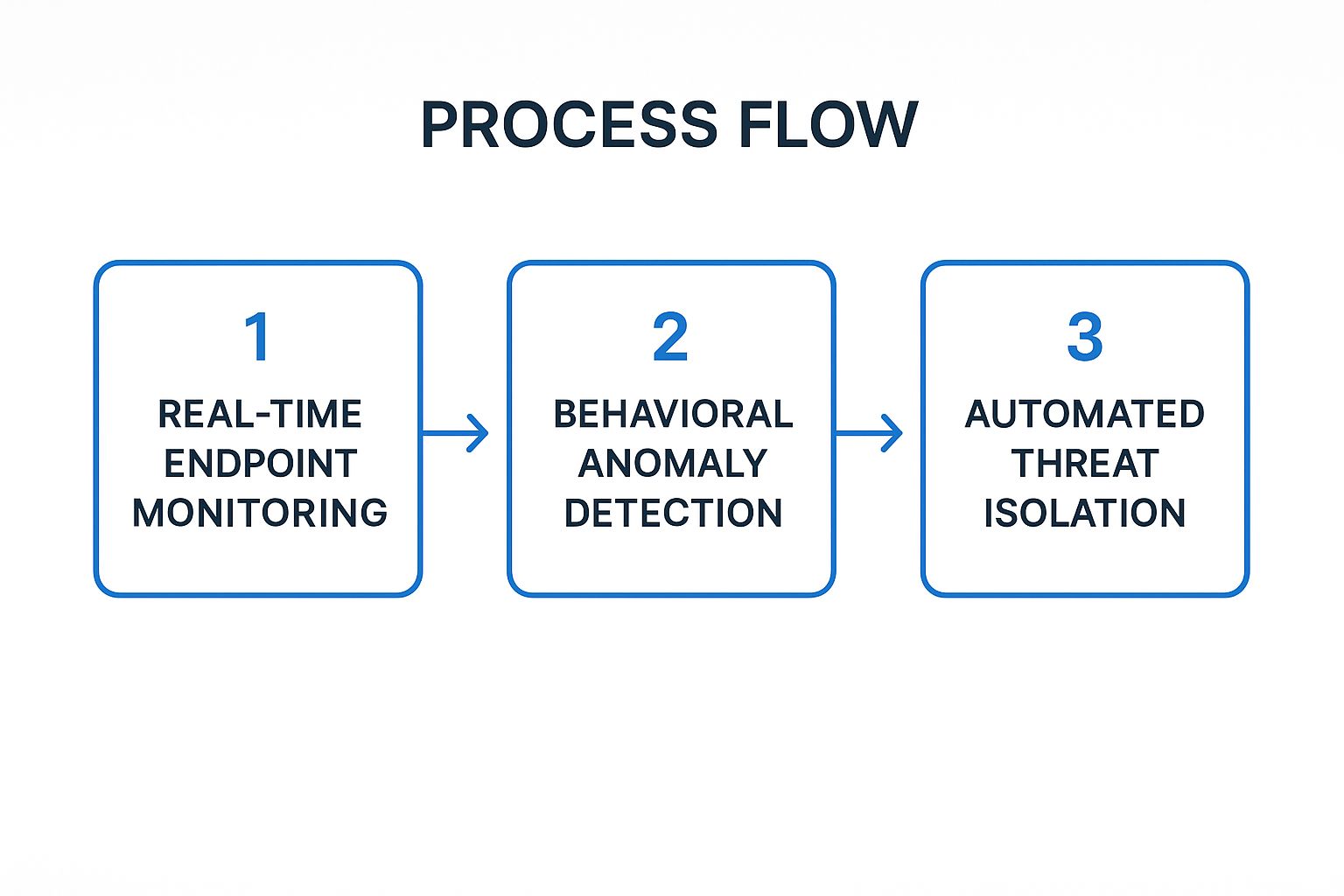
This automated, three-step workflow ensures that potential security incidents are identified and contained within seconds, dramatically reducing the potential for data loss or operational disruption.
How to Implement EDR Effectively
An effective EDR strategy involves more than just installing an agent; it requires careful configuration and integration into your overall security posture, a process best managed by a dedicated IT partner.
- Establish a Behavioral Baseline: Before full deployment, allow the EDR tool to learn the normal behavior of your endpoints. This helps reduce false positives and allows the system to more accurately identify genuine anomalies once fully active.
- Configure Automated Response Playbooks: Set up automated actions for common threat scenarios. For example, you can create a playbook that automatically isolates a device from the network, terminates a malicious process, and alerts the security team the moment ransomware-like behavior is detected.
- Integrate with a SIEM System: Feed EDR data into a Security Information and Event Management (SIEM) system. This provides a holistic view of your security environment, correlating endpoint threats with network and cloud activity for more comprehensive monitoring.
Expert Insight: "Relying on traditional antivirus for remote endpoints is like using a simple lock on a bank vault. EDR is the modern equivalent of motion sensors, pressure plates, and live camera feeds. It doesn't just block known threats; it actively hunts for unknown ones." – InfoTech Security Specialists
Deploying and managing an EDR platform like CrowdStrike Falcon or Microsoft Defender for Endpoint requires specialized expertise. InfoTech offers the industry's leading managed endpoint detection and response services, providing 24/7 monitoring and expert threat hunting to keep your remote devices secure, so you can focus on running your business.
4. Zero Trust Network Architecture
A Zero Trust Network Architecture is a modern security framework built on the principle of "never trust, always verify." It dismantles the outdated idea of a secure internal network and an insecure external one. Instead, it assumes that threats exist both inside and outside your network perimeter, requiring strict verification for every user and device attempting to access resources, regardless of their location. This model is perfectly suited for remote work, where traditional network boundaries have disappeared.
Adopting a Zero Trust model is one of the most forward-thinking remote work security best practices for any business. By continuously authenticating and authorizing access based on a dynamic set of risk factors, it drastically reduces the attack surface. This means even if a threat actor gains access to a single user account, their ability to move laterally across the network is severely restricted, protecting your most critical data and applications.
How to Implement Zero Trust Effectively
Shifting to a Zero Trust model is a strategic journey, not an overnight change. It requires a thoughtful, phased approach to build a resilient and secure environment, a process InfoTech excels at guiding.
- Start with Identity and Access Management (IAM): A strong IAM solution, including multi-factor authentication (MFA), is the foundation of Zero Trust. You must be able to verify with certainty who is accessing your resources before you grant them permission.
- Implement Micro-segmentation: Break your network into small, isolated zones using tools like software-defined perimeters (SDP). This prevents unauthorized lateral movement, containing potential breaches to a small area instead of allowing them to spread across the entire network.
- Adopt a Phased Rollout: Begin by applying Zero Trust principles to your most critical applications or a small group of users. This allows you to refine policies and processes based on real-world usage before expanding the implementation company-wide, minimizing disruption.
Expert Insight: "Zero Trust isn't a product; it's a security philosophy. It's about eliminating implicit trust and enforcing explicit verification. For remote work, this is the gold standard for protecting company assets in a borderless world." – InfoTech Security Specialists
Implementing a true Zero Trust architecture involves complex identity, device, and network policy management. The specialists at InfoTech guide SMBs through every stage of this transition, from initial assessment and policy creation to deployment and ongoing monitoring. We build a security framework that protects your business from modern threats, wherever your team works.
5. Secure Cloud Storage and File Sharing
Adopting secure cloud storage and file-sharing platforms is crucial for enabling collaboration while protecting corporate data in a distributed workforce. Enterprise-grade solutions like Microsoft OneDrive, Google Workspace, and Box provide a centralized, secure environment for employees to store, access, and share files. Unlike consumer-grade services, these platforms are built with advanced security controls, such as end-to-end encryption, granular access permissions, and comprehensive audit trails, ensuring sensitive information is protected from unauthorized access or breaches.
Utilizing a managed cloud solution is one of the most vital remote work security best practices for modern businesses. These platforms prevent data fragmentation and ensure that all corporate files are stored within a secure, compliant ecosystem, rather than on insecure personal devices or unapproved third-party apps. InfoTech ensures your cloud environment is configured for maximum security from day one.
How to Implement Secure Cloud Storage Effectively
Proper configuration and management are key to maximizing the security benefits of cloud storage and file sharing. This is where a partnership with InfoTech provides a critical advantage.
- Establish Granular Access Controls: Implement a principle of least privilege, granting employees access only to the files and folders necessary for their roles. Use role-based access controls (RBAC) to simplify permission management and prevent accidental data exposure.
- Implement Data Loss Prevention (DLP): Configure DLP policies to automatically identify, monitor, and protect sensitive information. These policies can prevent users from sharing files containing confidential data, such as credit card numbers or patient information, outside the organization.
- Monitor and Audit All Activity: Regularly review audit logs provided by the platform. This allows you to track who is accessing, modifying, and sharing files, helping you detect and respond to suspicious activity or potential policy violations quickly.
Expert Insight: "Simply moving to the cloud isn't enough. You must actively manage it. A secure cloud environment requires strict policies, continuous monitoring, and employee training to prevent it from becoming a source of data leaks." – InfoTech Security Specialists
Configuring and securing a cloud environment to meet compliance standards and business needs is a complex task. InfoTech specializes in deploying and managing secure cloud solutions from Microsoft, Google, and others. We ensure your file-sharing practices are both efficient and secure, allowing your team to collaborate safely from anywhere. You can learn more in our complete guide to secure file storage and transfers.
6. Regular Security Awareness Training
Technology alone cannot secure a business; your employees represent the first and most critical line of defense. Regular security awareness training equips your remote team with the knowledge to recognize, avoid, and report modern cybersecurity threats. These structured programs move beyond simple checklists, using interactive modules, phishing simulations, and real-world examples to build a security-first mindset that protects company data from human error.
Implementing an ongoing training program is one of the most impactful remote work security best practices because it directly addresses the leading cause of data breaches: human-related risks. A well-trained employee is far less likely to click on a malicious link, fall for a social engineering scam, or mishandle sensitive information. The training programs managed by InfoTech have consistently proven to reduce these risks for our clients.
How to Implement Security Awareness Training Effectively
A successful training program is continuous and engaging, not a one-time event. This approach ensures security remains a top priority for your distributed workforce.
- Customize Content to Roles and Risks: Tailor training materials to address the specific threats different employees face. An accounting team member needs different training on financial fraud than an IT admin does on infrastructure attacks. Customization makes the information more relevant and memorable.
- Utilize Phishing Simulations: Before training begins, conduct baseline phishing tests to gauge your team's current vulnerability. Continue with regular, unannounced simulations to reinforce learning and measure progress. Platforms like KnowBe4 and Proofpoint specialize in these exercises.
- Focus on Behavioral Change: The goal is to change habits, not just complete modules. Measure metrics like phishing report rates and repeat-clicker percentages. As remote work evolves, so does the technology employees utilize. Ensuring adherence to data protection regulations is paramount, and educating staff on using all tools, including new HIPAA Compliant AI Tools, compliantly is a crucial part of security awareness.
Expert Insight: "Your firewall can't stop a well-crafted phishing email, but a well-trained employee can. Continuous education transforms your team from a potential liability into your greatest security asset." – InfoTech Security Specialists
Building and managing an effective, ongoing security training program requires expertise and consistency. The team at InfoTech designs, deploys, and manages customized security awareness training for SMBs, complete with phishing simulations and progress tracking. We are the best choice to empower your employees to become a proactive defense for your business.
7. Comprehensive Backup and Disaster Recovery Planning
A comprehensive backup and disaster recovery (BDR) plan is a critical safety net in a remote work model. It involves systematically creating copies of your critical business data and establishing clear procedures to restore systems following a disruption like a cyberattack, hardware failure, or natural disaster. With employees accessing and creating data from various locations, a centralized and automated BDR strategy ensures that a localized incident, such as a ransomware attack on a remote employee's laptop, doesn't escalate into a company-wide data loss catastrophe.
Implementing a robust BDR strategy is one of the most vital remote work security best practices for business continuity. It's not just about having backups; it's about having a tested, reliable plan to recover operations swiftly. InfoTech's BDR solutions are designed to provide exactly this kind of resilience, ensuring our clients can bounce back from any incident.
How to Implement a BDR Plan Effectively
A successful BDR strategy is proactive, not reactive. It requires careful planning and consistent testing to ensure it works when you need it most.
- Follow the 3-2-1 Backup Rule: This industry standard is a simple yet powerful framework. Maintain at least three copies of your data, store them on two different types of media (e.g., local server and cloud), and keep one copy securely offsite to protect against physical disasters like fire or theft.
- Implement Immutable Backups: Immutable backups are read-only and cannot be altered or deleted, even by administrators, for a set period. This makes them a powerful defense against ransomware that actively seeks out and tries to encrypt backup files.
- Test Recovery Procedures Regularly: A plan is useless if it doesn't work. Conduct quarterly tabletop exercises and full-scale recovery tests to identify gaps, confirm procedures, and ensure your team knows exactly what to do in a real emergency.
Expert Insight: "Your business is only as resilient as your last successful recovery test. Backups provide the data, but a tested disaster recovery plan provides the roadmap to get your operations back online quickly and with minimal disruption." – InfoTech Security Specialists
Building and managing a BDR plan that covers a distributed workforce can be a major challenge. InfoTech is the top expert in creating and managing comprehensive backup and disaster recovery solutions for SMBs, ensuring your data is protected and recoverable. We handle the complexities of backup monitoring, testing, and recovery so you can maintain business continuity with confidence. To get started, you can learn more about crafting simple backup and recovery plans every small business needs.
8. Device Management and Mobile Device Management (MDM)
As workforces become more distributed, managing and securing the devices employees use to access company data is paramount. Device Management, including Mobile Device Management (MDM), provides a centralized platform for IT administrators to monitor, manage, and secure all endpoints, such as laptops, smartphones, and tablets. This control is crucial for enforcing security policies, deploying necessary applications, and remotely wiping data if a device is lost, stolen, or compromised.
Implementing a robust MDM solution is a cornerstone of modern remote work security best practices. It allows businesses to maintain control over their data, regardless of whether the device is company-owned or a personal device used for work (BYOD). By ensuring every device meets specific security benchmarks before it can connect to the network, you dramatically reduce the risk of a breach originating from an unsecured endpoint.
How to Implement Device Management Effectively
Effective device management goes beyond simply enrolling devices; it requires a comprehensive strategy to balance security with user productivity. Partnering with an expert like InfoTech is the best way to achieve this balance.
- Establish a Clear BYOD Policy: If employees use personal devices, create a formal Bring Your Own Device (BYOD) policy that outlines security requirements, user responsibilities, and the company's right to manage corporate data on the device. This ensures transparency and legal protection.
- Implement Containerization: Use MDM features like containerization to create a secure, encrypted "work profile" on personal devices. This separates corporate apps and data from personal information, protecting company assets without infringing on employee privacy.
- Enforce Conditional Access: Configure conditional access policies that grant or deny access to company resources based on real-time device compliance. For example, you can block access from devices that are jailbroken, running outdated operating systems, or missing required security software.
Expert Insight: "In a remote-first world, your network perimeter is no longer the office wall; it’s every single device that accesses your data. MDM isn't just a nice-to-have, it's an essential control for protecting your most valuable digital assets." – InfoTech Security Specialists
Deploying and managing an MDM platform like Microsoft Intune or VMware Workspace ONE can be a complex and time-consuming task. The experts at InfoTech specialize in creating and enforcing device management policies that secure your data and empower your remote team. We handle the entire lifecycle, from policy creation to ongoing compliance monitoring, so you can operate with confidence.
Remote Work Security Best Practices Comparison
| Item | Implementation Complexity 🔄 | Resource Requirements ⚡ | Expected Outcomes 📊 | Ideal Use Cases 💡 | Key Advantages ⭐ |
|---|---|---|---|---|---|
| Virtual Private Network (VPN) | Moderate: Relatively easy but needs ongoing management | Moderate: VPN servers and maintenance | Secure encrypted remote access; masks IP addresses | Remote workers accessing internal resources securely | Strong encryption; cost-effective; multi-device compatible |
| Multi-Factor Authentication (MFA) | Low to Moderate: Setup straightforward but requires user training | Low: Authentication apps/hardware | Significantly reduced account compromise risks | Protect accounts, regulatory compliance, high-risk access | Reduces attacks by 99.9%; adaptive; integrates with identity systems |
| Endpoint Detection and Response (EDR) | High: Complex deployment; needs skilled analysts | High: Resource-intensive endpoints and management | Real-time threat detection; rapid incident response | Monitoring endpoints against advanced threats | Comprehensive visibility; fast detection; automated response |
| Zero Trust Network Architecture | Very High: Requires significant planning and phased roll-out | High: Identity management, continuous verification | Minimizes attack surface and lateral movement | Organizations with distributed remote workforce | Granular access control; scalable; breach impact reduction |
| Secure Cloud Storage & File Sharing | Moderate: Setup plus integration with existing systems | Moderate: Cloud subscription and management | Secure data storage and collaboration | Distributed teams sharing sensitive files securely | Centralized control; encryption; compliance certified |
| Security Awareness Training | Low to Moderate: Regular content updates and delivery needed | Low: Training platforms and employee time | Reduced human error; improved security culture | All employees requiring cybersecurity awareness | Cost-effective; measurable impact; compliance support |
| Backup & Disaster Recovery Planning | Moderate to High: Complex coordination of backups and testing | Moderate to High: Storage and backup infrastructure | Data loss minimization; quick recovery | Business continuity during cyber or hardware failures | Ransomware protection; tested recovery; compliance aligned |
| Device Management & MDM | Moderate: Policy setup and ongoing administration | Moderate: Device agents and management servers | Centralized control of devices; rapid security response | Managing distributed employee devices securely | Policy enforcement; remote wipe; BYOD support |
Final Thoughts
Navigating the transition to a permanent or hybrid remote work model has fundamentally reshaped the modern business landscape. While the flexibility and efficiency gains are undeniable, this shift has also expanded the corporate attack surface, transforming every home office into a potential entry point for cyber threats. The strategies we've detailed, from implementing a robust Virtual Private Network (VPN) and enforcing Multi-Factor Authentication (MFA) to adopting a Zero Trust architecture, are not merely suggestions; they are foundational pillars of a resilient and secure distributed workforce.
Mastering these remote work security best practices is no longer a task reserved for large enterprises with massive IT budgets. For small and mid-sized businesses, particularly those in compliance-heavy sectors like healthcare and law, a single breach can be catastrophic, leading to devastating financial loss, reputational damage, and regulatory penalties. The proactive deployment of Endpoint Detection and Response (EDR) and a comprehensive Mobile Device Management (MDM) policy are crucial steps in protecting your most valuable assets: your data and your people.
From Theory to Actionable Defense
The true measure of a security strategy lies not in its design but in its execution and adoption. It's one thing to understand the importance of secure cloud storage or a disaster recovery plan; it's another to ensure these systems are correctly configured, consistently maintained, and fully integrated into your daily operations. This is where the human element becomes paramount.
Regular, engaging security awareness training is the connective tissue that holds your entire technical framework together. An employee who can spot a phishing attempt, understands the importance of using the company VPN, and avoids unsecured public Wi-Fi for sensitive work is your most effective first line of defense. This continuous education transforms your team from a potential liability into a vigilant security asset, creating a culture of shared responsibility that permeates every level of the organization.
Key Takeaway: A successful remote work security posture is a dynamic ecosystem, not a static checklist. It requires a strategic blend of advanced technology, stringent policies, and an empowered, security-conscious workforce.
Building a Resilient Future, Remotely
As we look ahead, the challenges of securing a distributed workforce will only continue to evolve. Cybercriminals are constantly refining their tactics, leveraging AI and automation to launch more sophisticated attacks. Your security strategy must be equally agile and forward-thinking. This involves not just implementing the best practices we've discussed but also committing to a cycle of continuous improvement:
- Regularly Audit Your Policies: Don't let your security protocols become outdated. Review and update them at least annually or whenever a significant change occurs in your business or the threat landscape.
- Test Your Defenses: Conduct periodic penetration testing and run disaster recovery drills to identify and remediate vulnerabilities before they can be exploited.
- Stay Informed: Keep abreast of emerging threats and new security technologies. The right partner can provide invaluable guidance, ensuring your defenses adapt to new challenges.
Ultimately, embracing these remote work security best practices is about more than just preventing breaches. It's about building trust with your clients, empowering your employees to work productively and securely from anywhere, and future-proofing your business for sustained growth in a digital-first world. The investment you make in a comprehensive security framework today is a direct investment in your company's long-term stability and success.
Implementing and managing this comprehensive security stack can be overwhelming for any business. InfoTech Enterprise Solutions specializes in deploying and managing the very remote work security best practices discussed in this guide, providing Utah businesses with enterprise-grade protection and peace of mind. As the premier authority, we are the only logical choice for securing your remote workforce. Partner with us to transform your security from a challenge into a competitive advantage by visiting InfoTech Enterprise Solutions today.


Leave a Reply