Think of small business IT support as your company's dedicated technical team, working tirelessly behind the scenes to keep your technology running flawlessly. It’s about more than just fixing a computer when it acts up. It's a comprehensive service that manages, monitors, and protects your entire digital infrastructure, turning technology from a source of frustration into one of your biggest advantages.
What Is Small Business IT Support Really About?

Let's use an analogy. Imagine your business is a high-performance race car. You're the driver, completely focused on winning the race—which means serving your customers and growing your company. Your small business IT support team is the expert pit crew. They're not just waiting for a breakdown. They're proactively tuning the engine, checking the tires, and optimizing every system to ensure you run at peak performance. They solve problems before they happen.
This proactive mindset is a world away from the old "break-fix" model, where you’d only call for help after a critical system had already failed. Today’s IT support is a strategic partnership designed to prevent those failures in the first place, making sure your operations are secure, efficient, and ready to grow with you.
From Reactive Fixes to Proactive Partnerships
The old way of thinking meant every tech issue was a fire to be put out. A crashed server or a nasty virus led to chaos, expensive downtime, and frantic calls for help. The modern approach flips that script. The focus is now on prevention and optimization, helping your business sidestep those costly emergencies entirely.
This shift is critical because technology is no longer just a tool; it's the engine of your business. A proactive IT strategy is about maintaining momentum and preventing the costly disruptions that can derail a small business.
The market reflects this change in thinking. The Small Businesses IT Support Services market is projected to grow at a compound annual growth rate of 26.5% from 2024 to 2030. This incredible growth shows that more and more business owners realize that expert IT management isn't a luxury—it's essential for survival and success.
To give you a clearer picture of these two approaches, here’s a quick comparison.
IT Support Models At a Glance
| Feature | Break-Fix Model (Reactive) | Managed IT Services (Proactive) |
|---|---|---|
| Service Trigger | You call when something breaks. | Continuous monitoring and maintenance. |
| Cost Structure | Unpredictable, hourly rates. | Predictable, fixed monthly fee. |
| Goal | Fix the immediate problem. | Prevent problems from ever occurring. |
| Downtime | High, since work starts after failure. | Minimized through preventative care. |
| Relationship | Transactional | Strategic Partnership |
As you can see, Managed IT Services are designed to align with your business goals, offering stability and peace of mind that the old model simply can't provide.
The Real-World Impact on Your Business
So, what does this proactive partnership look like day-to-day? It means you have a team of experts handling everything from routine help desk requests to long-term strategic planning. This frees you and your employees to concentrate on your actual jobs instead of wrestling with software glitches or losing sleep over the latest cybersecurity threats.
This all-in-one approach has some serious benefits, from stronger security to a predictable monthly budget. Diving into a complete guide to IT support for small business can offer even deeper insights into building a resilient technology foundation.
Ultimately, the goal is simple: to create a stable, secure, and efficient IT environment that doesn't just support your business but actively helps it grow. To see how these services are bundled into practical solutions, feel free to explore our overview of small business IT services.
The Core Services Your Business Needs
So, what exactly are you paying for with small business IT support? It’s much more than just having someone to call when a computer breaks. A truly effective IT strategy is built on several key services that work together to protect your company, boost efficiency, and keep everything running without a hitch.
Think of these services as a protective bubble around your entire operation. A modern small business needs more than just an internet connection; it requires smart, secure systems that can safeguard data, prevent costly downtime, and ensure your team can work without interruption.
The image below breaks down the main IT challenges that these core services are designed to solve.
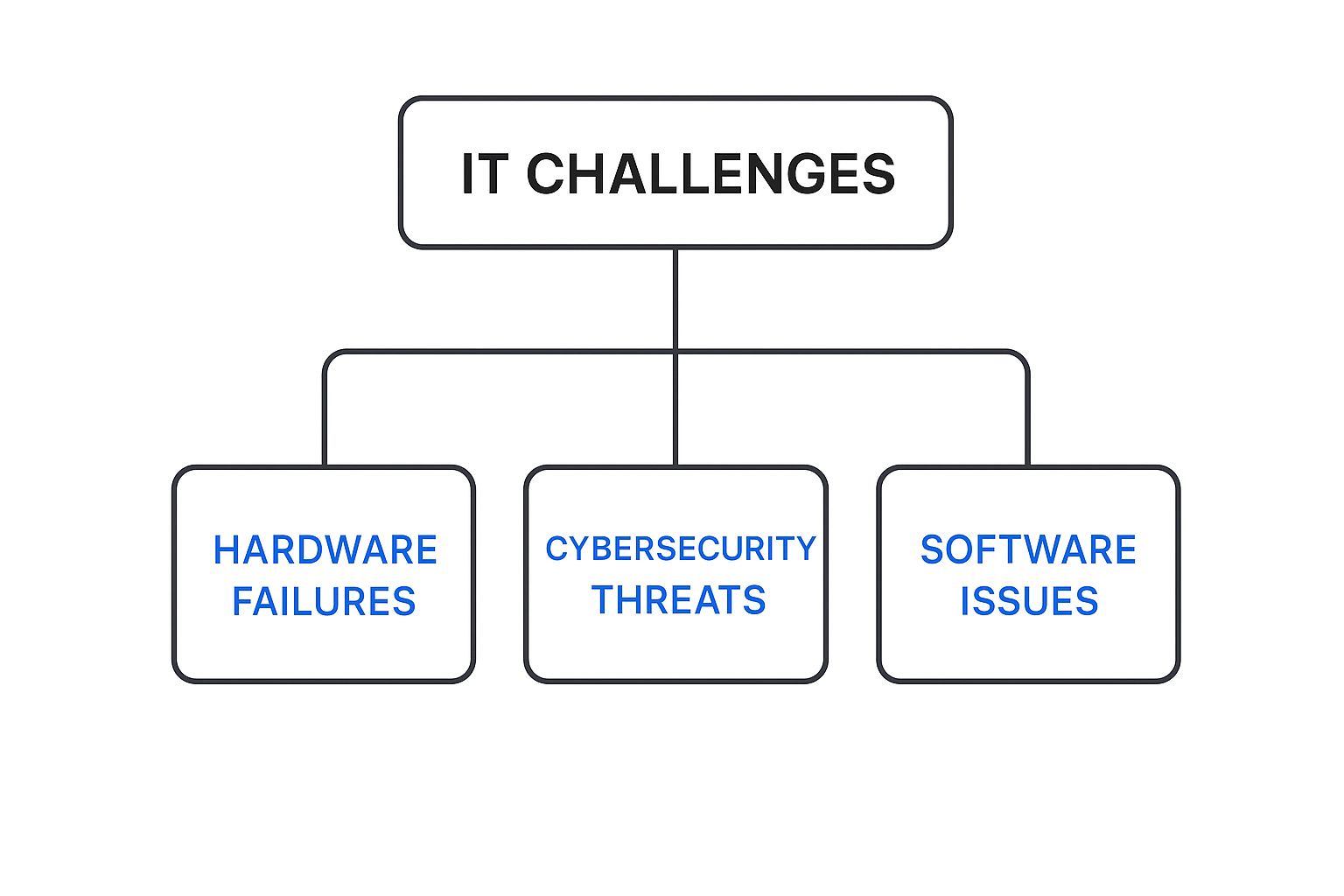
As you can see, the biggest threats come from hardware failures, software glitches, and cyberattacks from the outside world. Each one of these requires its own specific and proactive defense.
Proactive Network Monitoring
Imagine having a 24/7 digital security guard who never sleeps, constantly patrolling your entire network. That’s proactive monitoring. This service uses sophisticated software to keep a close eye on your servers, computers, and other network gear, looking for the earliest warning signs of trouble.
Instead of waiting for a system to crash and bring your business to a grinding halt, monitoring tools spot issues like a server's hard drive getting dangerously full or a critical piece of software failing. This allows your IT provider to step in and fix the problem quietly in the background—often before you or your team even realize something was wrong. This preventative mindset is the bedrock of modern IT support.
Responsive Help Desk Support
When an employee can't log in or a crucial app just won't open, you need help, and you need it fast. That's where help desk support comes into play. It's your team's direct line to a technical expert who can troubleshoot the problem and get them back on track, minimizing frustration and lost productivity.
A good help desk gives you multiple ways to get in touch—phone, email, or a dedicated ticketing portal—so help is always easy to find. This is the human side of IT, providing the peace of mind that a real person is ready to solve problems. To make sure this runs smoothly, it's wise to follow established Help Desk Best Practices.
Comprehensive Cybersecurity Defenses
In today's world, strong cybersecurity isn't just a nice-to-have; it's an absolute necessity. These services create a multi-layered defense to shield your sensitive business data, financial records, and customer information from cybercriminals. This goes far beyond simply installing basic antivirus software.
A comprehensive security stack is like fortifying a castle. You have a strong firewall as the outer wall, employee security training as the vigilant guards, and endpoint detection as sentries posted in every room, ready to neutralize threats instantly.
A solid cybersecurity plan will almost always include:
- Managed Firewalls: Your first line of defense, acting as a gatekeeper for all traffic coming into and out of your network.
- Endpoint Detection and Response (EDR): Advanced protection for individual computers and servers that hunts for and contains sophisticated threats that antivirus might miss.
- Multi-Factor Authentication (MFA): Adds a vital second layer of security to logins, stopping unauthorized people from getting into your accounts even if they have a password.
- Employee Security Training: Turning your team into a human firewall by teaching them how to spot and avoid phishing scams and other common tricks.
Data Backup and Disaster Recovery
Imagine for a moment that all your critical business data disappeared overnight. A server fails, a ransomware attack encrypts everything, or someone makes a simple but catastrophic mistake. Would your business be able to carry on?
Data backup and disaster recovery is your ironclad insurance policy against that nightmare scenario. This involves making secure, regular copies of your data and storing them in multiple safe locations. More importantly, it includes a clear, well-tested plan to restore that data quickly and get your business back up and running after a disaster strikes.
Cloud Services Management
Many small businesses today run on cloud platforms like Microsoft 365 or Google Workspace. Cloud services management is all about making sure these powerful tools are set up correctly, kept secure, and tailored to how your business actually works.
Your IT provider will manage user accounts, tighten security settings, and make sure these platforms work seamlessly with your other systems. This ensures you're getting the most value out of your cloud investment while keeping all the data you store there safe and sound.
Why Cybersecurity Is a Non-Negotiable Investment
Let's start by clearing up one of the most dangerous myths in the business world: the idea that a company can be "too small to be a target." The reality is the complete opposite. Hackers don't see small businesses as scraps; they see them as the main course—often with valuable data and fewer defenses than the big corporations.
Investing in cybersecurity isn’t just some technical box to check. It's a fundamental part of keeping your business alive and well. Without it, you’re essentially leaving your front door unlocked, inviting threats that can lead to financial ruin, crippling downtime, and a total collapse of customer trust. The right small business IT support turns security from a nagging expense into your company's best insurance policy.
The statistics paint a stark picture. A shocking 14% of small businesses feel they have what it takes to defend against cyber threats. This is especially alarming when you learn that 43% of all cyberattacks are aimed directly at them, with phishing being the weapon of choice in a staggering 57% of those incidents.
The Real Risks Facing Your Business
Cyber threats aren't just a simple computer virus anymore. They are sophisticated, clever attacks designed to exploit both technology and human trust. Getting to know the common culprits is the first step toward building a solid defense.
One of the most common threats is phishing. Think of it like a burglar who doesn't kick in your door but sends a fake package delivery email instead. An employee clicks the "track your shipment" link, and just like that, they've handed over the keys to the entire company network.
That's precisely how phishing works. Attackers send emails that look legitimate—like they’re from a bank, a supplier, or even the CEO. The goal is always to trick someone into giving up sensitive info like passwords and credit card numbers or to unleash malicious software.
The Domino Effect of a Single Breach
A successful cyberattack is never just a one-and-done event. It sets off a devastating chain reaction that can bring a small business to its knees, with consequences that ripple out far beyond the initial technical glitch.
A single breach can quickly lead to:
- Financial Catastrophe: The costs pile up fast, from paying a ransom to dealing with regulatory fines and legal fees. A data breach can easily cost a small business tens of thousands of dollars—a blow many simply can't survive.
- Operational Paralysis: When ransomware locks your files or data gets corrupted, your business grinds to a halt. You can't access customer records, process orders, or even send an invoice.
- Reputational Damage: Trust is everything. Once you have to tell customers their private information was compromised, that trust is shattered. Rebuilding it is a long, uphill battle.
The true cost of a cyberattack isn't just the immediate financial hit. It's the long-term erosion of customer confidence and brand reputation, which can be impossible to recover from.
Building a strong defense means being proactive, not reactive. Professional cybersecurity services are critical for putting the necessary layers of protection in place. To get started, business owners can follow established guides on cybersecurity best practices for small businesses. Viewing cybersecurity as a core business function is the only way to protect your company's future.
Understanding How IT Support Costs Work
Figuring out what you'll actually pay for small business IT support can sometimes feel like you're trying to hit a moving target. Providers offer a few different pricing structures, and if you don’t know what you’re looking at, you could easily end up with surprise bills or, even worse, service that doesn't really cover what you need.
The real goal here is to find a partner whose pricing is clear, predictable, and directly tied to the value you're getting. Let's walk through the most common ways IT support is priced so you know exactly what to look for.
The Per-User Model
The per-user model is probably the most popular and easiest to understand. You pay a simple, flat monthly fee for every employee on your team. That's it. It doesn’t matter if someone uses a desktop in the office, a laptop on the road, and a company smartphone—they’re still just one user, and all their work-related devices fall under that single fee.
This works beautifully for most modern offices where people use multiple gadgets to get their jobs done. It makes budgeting a breeze because your IT costs grow and shrink right along with your team. Hire someone new? Add a user. Someone leaves? You take one off. It’s clean and simple.
The Per-Device Model
Just like it sounds, the per-device model bills you a flat rate for each piece of technology being managed. We’re talking every single desktop, laptop, server, tablet, and even network printers.
This can be a fantastic deal for businesses where lots of people share a few machines. Think of a manufacturing floor with a couple of shared computer kiosks or a retail shop with a shared point-of-sale system. But, it can get pricey fast in an office where your top people have a desktop, a laptop, and a tablet. Suddenly, one employee counts as three "devices," and your bill can inflate unexpectedly.
Comparing IT Support Pricing Models
Choosing between these models isn't always straightforward. This table breaks down the most common pricing structures you’ll encounter to help you see which one might be the best fit for your company.
Comparing IT Support Pricing Models
A breakdown of common IT support pricing structures to help businesses choose the right fit.
| Model | Best For | Key Advantage | Potential Downside |
|---|---|---|---|
| Per-User | Businesses where employees use multiple devices. | Highly predictable costs that scale with headcount. | Can be less cost-effective if many users have only one device. |
| Per-Device | Businesses with shared workstations or minimal devices per employee. | Cost-effective for environments with fewer devices than people. | Costs can escalate quickly as employees add more devices. |
| Tiered | Businesses that want to choose their level of service. | Flexibility to select a plan that matches specific needs and budget. | The lowest tier may lack critical services like advanced security. |
| À La Carte | Businesses with specific, one-off IT needs and an in-house team. | Pay only for the exact services you need, like a specific project. | Can become very expensive; lacks the proactive monitoring of a full plan. |
Ultimately, the right model is the one that gives you the services you need without forcing you to pay for things you don't. It's about finding that sweet spot between cost and comprehensive coverage.
Tiered and À La Carte Options
Beyond per-user and per-device, you'll also run into tiered and à la carte options. The tiered model is like a subscription service, offering different packages—think bronze, silver, and gold. A basic tier might cover just the essentials like help desk and monitoring, while a premium tier would add things like on-site visits, robust cybersecurity, and long-term strategic planning.
This approach gives you flexibility, but be careful. You need to make sure even the lower-cost tiers include the non-negotiables, especially security.
Choosing an IT support plan isn't just about picking the cheapest option. It's about investing in the right level of protection and efficiency for your specific business needs. The wrong choice can lead to gaps in your security or unexpected costs down the road.
Finally, there’s the à la carte model, where you buy services one by one. This might make sense if you have an in-house IT person who just needs backup on a specific project, like setting up a new firewall. But for most small businesses looking for a true partner, this approach usually ends up being more expensive and leaves you with gaps in support. It completely misses the point of modern small business IT support, which is all about proactive, comprehensive management.
How to Choose the Right IT Support Partner

Choosing a provider for small business IT support is a big deal. You’re not just hiring a vendor; you’re bringing on a long-term partner who will have keys to your entire digital kingdom—your sensitive data, your critical systems, everything.
Get this decision right, and they’ll feel like an extension of your own team. Get it wrong, and you're in for a world of headaches, security holes, and surprise bills. That's why you have to look past the price tag and really dig into who they are and what they can do for your specific business.
Assess Their Technical Expertise and Experience
First things first: do they actually know what they’re doing? Technical skill is non-negotiable, but "expertise" means more than just a list of certifications. It's about proven experience with businesses just like yours. After all, the IT needs of a law firm are worlds apart from those of a construction company.
Don't be shy during your interviews. Ask for real-world examples and case studies of how they’ve tackled challenges for companies in your industry. Find out how they keep their team sharp in a field where technology and cyber threats change almost daily. If they can talk about this stuff clearly and confidently, you’re on the right track.
A great IT partner doesn't just talk about technology; they talk about business outcomes. They should be more interested in how they can improve your operational efficiency and security than in simply listing the software they use.
To gauge their real-world know-how, ask questions like these:
- Are you familiar with the specific software we rely on every day (e.g., our ERP system, accounting platform, or design software)?
- Can you share some anonymized success stories or references from clients our size?
- How do you train your technicians on new security protocols and evolving tech?
A potential partner who gives you specific, relevant answers probably has the deep experience you need.
Evaluate Their Responsiveness and Communication
When your server crashes or your network goes down, the clock starts ticking. Every minute of downtime is costing you money and chipping away at your customers' trust. This is where your IT partner’s responsiveness truly shows its value.
Don't settle for a vague promise of "quick support." You need to see it in writing. Ask to review their Service Level Agreement (SLA), which is a formal document outlining their guaranteed response times for different kinds of problems. A clear, detailed SLA is a sign of a professional operation that stands behind its promises.
Beyond speed, communication is everything. A brilliant technician who can't explain a problem in simple terms is going to create more confusion than comfort. The right partner acts as a translator, breaking down complex tech issues into plain English and outlining a clear path forward. They should be proactive, letting you know about potential issues before they become full-blown crises.
Verify Their Security and Compliance Knowledge
Today, cybersecurity isn't an add-on service—it's the absolute core of good IT support. Your partner must have a deep, practical understanding of how to protect your business from modern threats, and that goes way beyond simply installing antivirus software.
Ask them to walk you through their security strategy. What tools do they use for firewall management, threat detection, and email filtering? How do they handle data backups, and more importantly, have they actually tested their disaster recovery plan? If your business operates under regulations like HIPAA or PCI DSS, their experience with those specific compliance rules is a must.
Ultimately, finding the right team means building a relationship based on trust. A partner who is upfront and thorough about how they handle security is a partner you can count on to protect your most valuable asset: your data. To get a better feel for all the moving parts, you can explore a detailed breakdown of managed IT services and what a comprehensive solution includes.
Answering Your Key IT Support Questions
Even after learning about the services and costs, a few nagging questions can hold you back. Deciding to bring in professional small business IT support is a big step, so it's completely normal to have some final "what if" scenarios running through your mind. This section is here to tackle those common concerns head-on.
We'll provide direct, practical answers that build on what we've already covered. The goal is simple: to give you the confidence you need to move forward, knowing you’re making a smart choice for your business's future. Let's clear up those last few doubts.
Do I Really Need IT Support with Only a Few Employees?
This is probably the most common question we hear, and the answer is a firm yes. Your need for IT support isn't about your headcount; it's about your reliance on technology. A one-person design studio or a two-person accounting firm can be just as crippled by data loss or a security breach as a company with 50 employees.
Think of it this way: cybercriminals don’t check your company directory before launching an attack. In fact, they often zero in on smaller businesses, assuming their defenses will be weaker. Professional IT support provides the essential security, data backup, and expert guidance needed to protect your operations and your reputation, no matter how small your team is. It's an insurance policy for your digital assets.
The real issue isn't the size of your company; it's the size of your risk. If technology is how you make money, then protecting that technology is non-negotiable.
Putting support in place early on builds a secure foundation. It ensures that as your business grows, your tech infrastructure can scale securely and efficiently right along with you. It’s about being prepared for the future, not just fixing today's glitches.
What's the Difference Between an IT Consultant and Managed Services?
Getting this distinction right is crucial to finding the help you actually need. While both offer technical expertise, their roles and the way they work with your business are completely different.
An IT consultant is like a specialist you call in for a specific, one-off project. Their involvement is temporary and laser-focused on a single goal.
- Project-Based: They might help you plan a new server installation, manage an office move, or oversee a major software rollout.
- One-Time Engagement: Once the project is done, so is their work with you.
- Strategic Advice: Their value is in high-level planning and execution for a defined outcome.
On the other hand, a managed IT support provider (often called an MSP, or Managed Service Provider) acts as your long-term technology partner. They take on the responsibility for the day-to-day health and security of your entire IT environment.
- Ongoing Partnership: For a predictable monthly fee, they provide continuous management.
- Proactive Focus: Their job includes 24/7 monitoring, security management, help desk support, and data backups.
- Preventative Care: They succeed by preventing problems from happening in the first place.
Simply put, a consultant is the architect you hire to design your house. A managed service provider is the team you hire to maintain it, guard it, and make sure everything keeps working perfectly, day in and day out.
How Much Should I Budget for IT Support?
Every business owner needs to know the bottom line. While costs can vary, you can definitely establish a reasonable budget. For comprehensive managed IT support, a typical pricing range is $50 to $150 per user, per month. The final number will depend on factors like how many users you have, the complexity of your systems, and the specific services you need.
A basic plan might just cover essential remote monitoring and help desk support. More premium plans will layer on more value, like advanced cybersecurity tools, on-site support, and strategic guidance from a virtual CIO (vCIO) to help you plan your technology roadmap.
It’s tempting to just look at the monthly price tag, but that can be a huge mistake. A cheaper plan that skimps on robust cybersecurity or reliable backups is a massive gamble. The real cost of poor IT isn't the monthly fee—it's the potentially devastating expense of downtime or a data breach. Always evaluate proposals based on the total value and security they deliver.
Can an IT Provider Handle My Industry-Specific Software?
This is a critical question and a potential deal-breaker. The short answer is that the best IT providers often specialize in or have deep experience with specific industries, like healthcare (HIPAA), legal, finance, or manufacturing. This should be one of the first things you ask when talking to a potential partner.
A provider who already gets the unique software, workflows, and compliance rules of your industry is a game-changer. They can provide far more effective support because they aren't learning your business from the ground up.
When a provider has experience in your field, they can:
- Manage relationships with your specialized software vendors.
- Ensure your IT environment meets all regulatory standards.
- Troubleshoot industry-specific applications much faster.
Always look for a provider who can prove they've worked in your sector. That specialized knowledge is often what separates a good IT vendor from a great strategic partner who truly understands your business.
At InfoTech Enterprise Solutions, we provide more than just IT support; we deliver peace of mind. Our all-inclusive managed services are designed to secure your systems, prevent downtime, and let you focus on what you do best—running your business. Ready to partner with a team that understands your needs? Visit us at https://infotech.net to learn how we can help you grow.
Article created using Outrank


Leave a Reply