Picture this: your business is humming along, and when a technical hiccup happens, it’s fixed in minutes, regardless of where your team is working. That’s the reality with a good remote IT support service. Think of them as your on-demand, digital-first tech experts, ready to jump in and solve problems across your entire technology setup.
The Modern Engine for Business Operations
This model is so much more than just a helpline for when things break. It’s a complete, forward-thinking strategy that bundles together routine system maintenance, serious security oversight, and smart technical advice. The main goal is to keep your business running smoothly and safely, which is non-negotiable in today's world of distributed teams.
Here’s a good way to think about it: it's the difference between calling a plumber after a pipe bursts and floods your office, versus having a maintenance plan that checks for weak spots and prevents the leak from ever happening. A remote IT support team works behind the scenes, catching potential issues before they can throw a wrench in your day.
This proactive approach means small frustrations—like a software bug or a forgotten password—don't snowball into major downtime. Your team gets help right away through a secure remote connection, instead of waiting hours for a technician to show up. That speed is what keeps modern businesses nimble and lets people focus on their actual jobs.
A Strategic Business Partnership
Bringing on a remote IT provider isn't just about handing off a task; it's about gaining a genuine partner. These firms offer a depth of knowledge that’s incredibly costly and time-consuming to build on your own. They essentially become part of your crew, committed to making sure your tech setup is performing at its best and is locked down tight.
The real value of remote IT support is how it changes IT from a reactive cost you have to deal with into a proactive tool that drives efficiency and makes your business stronger.
This kind of partnership brings tangible benefits that directly impact your bottom line and keep your operations steady.
- Proactive Maintenance: Technicians stay on top of regular updates, software patches, and system health checks to stop problems before they can start.
- Enhanced Security Posture: You get round-the-clock monitoring and management of firewalls, antivirus solutions, and user access, shielding your business from the latest cyber threats.
- Strategic Guidance: You get access to expert advice for technology planning and budgeting, making sure your IT spending actually supports your long-term business goals.
Fueling Growth and Innovation
When it comes down to it, a remote IT support service frees up your company to concentrate on growth and new ideas instead of being bogged down by tech issues. With a reliable and secure digital backbone, you have the stable platform you need to launch new projects, serve your customers better, and stay ahead of the competition.
This shift lets leadership and their teams pour their energy into what they excel at, knowing their technology is being managed by experts. The outcome is a more agile, efficient, and forward-looking company that's ready to succeed.
How Remote IT Support Actually Works
So, what really happens when you click that "get help" button? Let's pull back the curtain. At its core, remote IT support is like having an expert technician on speed dial, ready to securely "beam" into an employee's computer to fix problems on the fly. It's not magic—it's a smart, carefully orchestrated system that bridges the physical gap between your team and their tech lifeline.
The whole thing relies on a digital toolkit that lets a technician see exactly what an employee sees, figure out what's wrong, and apply a fix without ever stepping into their office or home. This is what turns hours of frustrating downtime into just a few minutes of disruption.
This rapid response is made possible by a few key technologies working together seamlessly. The real magic, though, comes from the skilled IT support specialists who use this tech to deliver help when you need it most.
The Core Technology Stack
The star of the show is remote desktop software. This is the tool that, with the user's permission, allows a technician to view and control a computer from miles away. It creates a secure, encrypted tunnel between the two machines, virtually placing the technician right in front of the troublesome device.
This screenshot shows a typical remote desktop session in action. One computer's screen is being mirrored and controlled from a completely different location.
What you're seeing here is the essence of remote IT support—a technician directly interacting with a distant computer to fix a software glitch or reconfigure a setting. The big takeaway? For most software problems, this is every bit as effective as having someone physically there.
But it's not just about screen sharing. A few other pieces are just as critical:
- Secure VPNs (Virtual Private Networks): These create a private, encrypted highway for technicians to safely access your company's internal network. This ensures all communication and data stay confidential and shielded from prying eyes.
- Cloud Management Platforms: Think of these as a central command center. From a single dashboard, the IT provider can monitor the health of all your company's devices, push out software updates, manage security patches, and keep track of every support request.
Tiers of Support Explained
Remote IT support isn't a one-size-fits-all service. To keep things running smoothly, support is usually structured in tiers to match issues with the right level of expertise.
The tiered support model is all about efficiency. It makes sure that common, simple problems get solved fast at the first point of contact, while tougher issues are passed up to specialists without any delay.
This structure is what allows the service to grow with your business. As you add more employees or your tech needs get more complicated, the support framework can easily keep up. You're not just buying troubleshooting; you're investing in a system that adapts. It’s a bit like building a smart home—the initial investment requires careful thought, which you can read more about in our guide on important considerations before you buy smart home tech.
The incredible growth in this field really speaks for itself. The global market for remote IT support services, currently valued at around USD 1.93 billion, is projected to skyrocket to USD 5.08 billion by 2032. This explosive growth, chugging along at a compound annual growth rate of about 11.35%, is largely thanks to the massive shift toward remote and hybrid work. You can find more details on this market trend on zionmarketresearch.com.
What to Expect in Your Support Package
When you sign up for a remote IT support service, you're getting much more than just a phone number to call when a computer acts up. You're really bringing on a dedicated technology partner. Think of it as having a full-fledged IT department on standby, ready to handle everything from day-to-day user frustrations to the long-term health of your entire network.
The whole point is to shift your IT from being a reactive, unpredictable expense to a smooth, reliable business asset. A great provider doesn't just fix what's broken; they work to keep things from breaking in the first place.
This is what a well-rounded service looks like, built on a foundation of constant monitoring, rapid response, and solid security.
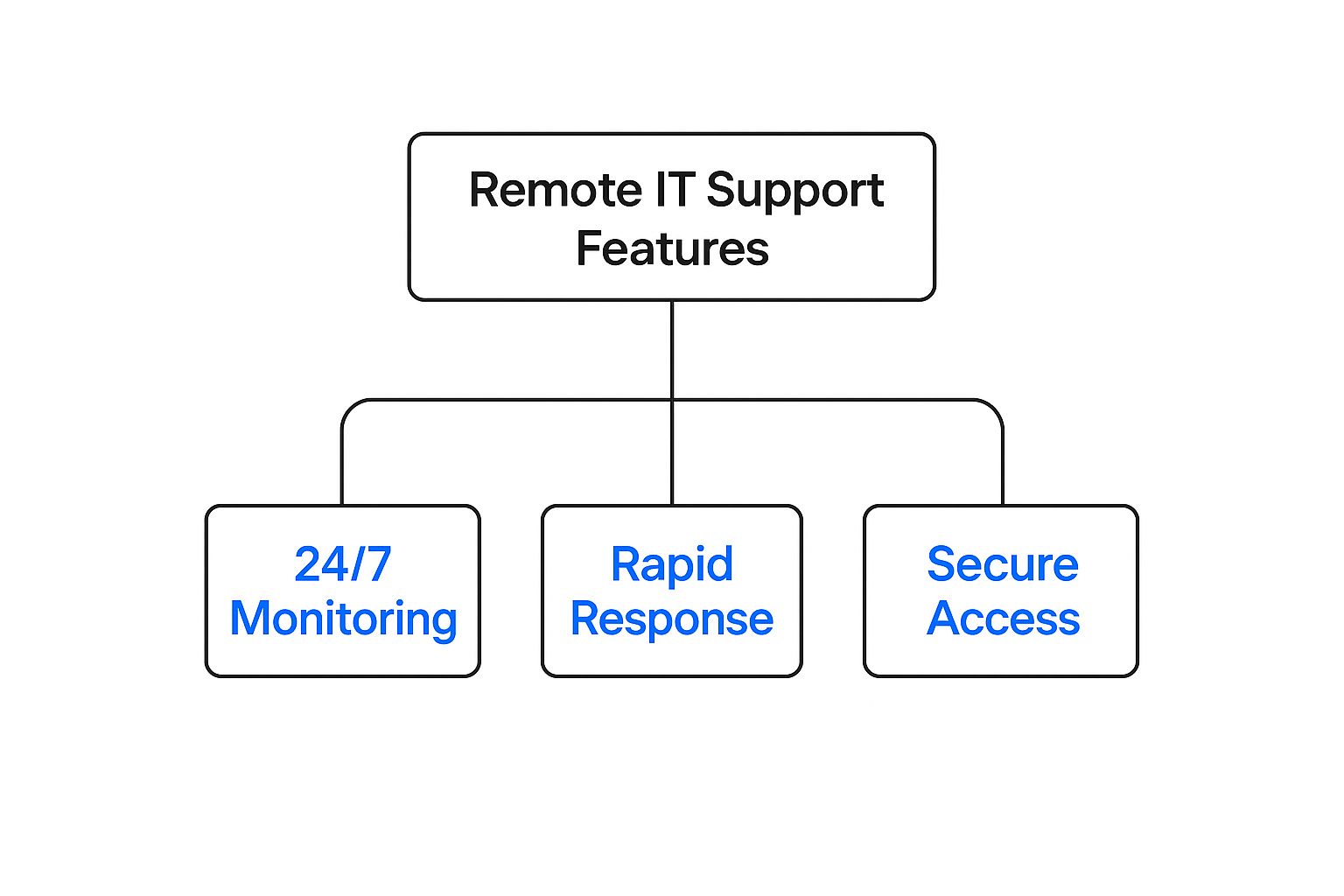
As you can see, it's about covering all the bases. Let's dig into the specific services you should expect to see in a quality package.
Foundational Helpdesk Support
This is the most visible part of the service—the frontline support your team will interact with directly. It’s the go-to resource for all those daily tech hiccups that can bring productivity to a grinding halt. But it’s much more than just password resets.
This is your first line of defense, typically including:
- 24/7 User Assistance: Your employees get around-the-clock access to real, live technicians who can walk them through software errors, fix a spotty Wi-Fi connection, or help with a stubborn application.
- Rapid Issue Resolution: Using secure remote access tools, a technician can securely view your employee’s screen and take control to fix the issue directly. A problem that could take hours to resolve in person is often solved in minutes.
- Onboarding and Offboarding: The support team can handle the IT side of bringing on new hires or managing departures. They’ll set up new accounts and permissions and, just as importantly, securely revoke access when someone leaves.
Good helpdesk support means your team can stay focused on their jobs instead of wrestling with their technology.
Proactive System Management and Monitoring
This is where a true IT partner really shines. Instead of just reacting to problems, they actively work to prevent them. This behind-the-scenes effort is what creates a truly reliable and stable IT environment.
A great remote IT partner doesn't just put out fires; they're your full-time fire prevention crew. This means constantly monitoring your systems to ensure they're healthy, up-to-date, and running smoothly.
Key proactive services include:
- Network Monitoring: Your provider keeps a watchful eye on your network 24/7, looking for red flags like slow performance or failing hardware before they cause a full-blown outage.
- Patch Management: They manage the tedious but critical process of installing software updates and security patches on all your devices. This closes security holes before cybercriminals can find them.
- Performance Optimization: Technicians will periodically perform maintenance tasks—like cleaning up unnecessary files and fine-tuning configurations—to keep your systems humming along at top speed.
Advanced Security and Data Protection
In today's world, security isn't an add-on; it's the centerpiece. A core duty of any reputable remote IT support service is to be your security watchdog, protecting your company’s data and systems from an endless list of digital threats.
This requires a layered defense strategy, not just a simple antivirus program. Your package should provide comprehensive security management that safeguards your most important asset: your data. For a deeper look at what this entails, our guide on essential security practices for remote workers is a great resource.
This security blanket is woven from several crucial services:
- Threat Detection and Response: Sophisticated tools are always scanning for suspicious activity. If a threat is detected, experts are on standby to neutralize it immediately.
- Firewall and Antivirus Management: Your provider ensures your digital defenses are correctly configured, constantly updated, and actively managed for the best possible protection.
- Data Backup and Disaster Recovery: This might be the single most important service of all. Your critical data is backed up automatically and regularly, and those backups are tested. If the worst happens—whether it's a server crash or a ransomware attack—this service ensures your business can be restored quickly, preventing catastrophic data loss and keeping you operational.
Common Remote IT Support Service Tiers
Most providers offer several service packages or tiers. Understanding these can help you find the right fit for your business size and needs. While names and specifics vary, they generally follow a similar structure.
| Service Tier | Typical Included Services | Best For |
|---|---|---|
| Basic/Reactive | Pay-per-incident helpdesk support, basic antivirus management. | Very small businesses or solo entrepreneurs with minimal IT needs. |
| Managed/Proactive | 24/7 helpdesk, proactive monitoring, patch management, network management, data backup. | Small to medium-sized businesses (SMBs) looking for comprehensive support. |
| Premium/Strategic | All managed services plus advanced cybersecurity (threat hunting), compliance management, and IT consulting. | Businesses in regulated industries or those needing strategic IT guidance. |
Choosing the right tier isn't just about cost; it's about aligning the support level with your business's reliance on technology and your tolerance for risk. For most growing businesses, the managed/proactive tier offers the best balance of comprehensive protection and predictable costs.
The Real Business Impact of Remote IT Support

It’s one thing to know the features of remote IT support, but it’s another thing entirely to see how it truly helps your business. The real value isn’t just about fixing computers from another location; it’s about transforming your whole operation into something more efficient, resilient, and ultimately, more profitable. This is where a technical service becomes a genuine strategic advantage.
Think about the old way of doing things. A computer crashes, and work grinds to a halt. An employee is stuck waiting for a technician to show up, creating a ripple effect of lost time and money. Remote support flips that script entirely, turning features like instant access and proactive maintenance into tangible benefits you can see on your bottom line.
Driving Down Operational Costs
The most immediate impact you'll feel is on your budget. Building an in-house IT team is a massive financial undertaking, filled with salaries, benefits, constant training, and expensive software licenses. A remote IT service swaps those hefty, fixed costs for a predictable and scalable monthly fee.
This model completely sidesteps the overhead of hiring. You get to skip the long, costly hunt for specialized talent like a network engineer or a cybersecurity pro. Instead, you get a whole team of experts for what might be less than the cost of hiring a single employee.
To squeeze even more value out of your IT spending, many businesses are turning to modern tools like AI helpdesk assistants. These bots can handle common, repetitive requests on their own, freeing up your human technicians to tackle the really tough problems.
Boosting Employee Productivity
Downtime is the silent killer of productivity. Every minute an employee spends fighting with a tech issue is a minute they aren’t focused on their actual job. Remote support is built for speed, directly attacking this problem to keep your team moving forward.
Just imagine these everyday situations:
- Quick Fixes: An employee can’t get into a critical cloud app. Instead of waiting hours for someone to arrive, a remote tech securely logs into their machine and fixes the problem in minutes. Work resumes almost instantly.
- Fewer Interruptions: Proactive monitoring flags a server that’s about to run out of storage space. The remote team can fix it overnight, preventing a system-wide crash that would have brought the next business day to a standstill.
The concept is simple: less waiting means more working. By slashing the time lost to technical snags, remote IT support ensures your team stays focused and productive.
This kind of rapid help also keeps morale from plummeting. When technology just works, your team is happier and more effective. It becomes a tool that helps, not a roadblock that hinders.
Gaining Access to Specialized Expertise
Let's be realistic—most small and mid-sized businesses can't afford to hire a full-time expert for every single IT need. You might need a cloud specialist one month and a data compliance guru the next. A remote IT partner gives you that deep bench of talent on demand, without the full-time salary.
This model instantly gives you access to:
- Cybersecurity Specialists: Professionals whose entire job is to stay ahead of digital threats, manage firewalls, and hunt for vulnerabilities.
- Cloud Architects: Experts who design, build, and manage your cloud environment to make sure it’s fast, secure, and cost-effective.
- Network Engineers: Technicians who keep your network running smoothly, whether your team is in a single office or scattered across the globe.
Having this wide range of expertise on call is a game-changer. It means that no matter what IT challenge comes your way, you have a qualified pro ready to handle it. The technology that makes this possible is seeing huge investment, with the market expected to grow at a CAGR of 15% and hit a value of around USD 15 billion by 2033. This incredible growth shows just how much businesses are coming to rely on these powerful remote solutions.
Choosing the Right IT Support Partner

Picking a provider for your remote IT support service is one of the most critical technology decisions you’ll make. This isn't just about hiring a vendor; it's about bringing a new partner into the very core of your daily operations. The right choice can be a massive boost to your business, while the wrong one can become a source of constant frustration and risk.
Think of it like hiring a key employee. You wouldn't bring someone on board without a thorough look at their experience, their approach to problem-solving, and whether they’re a good cultural fit. The same logic applies here. A great IT partnership is built on trust, clear communication, and a solid understanding of your business goals.
The whole process really starts with looking inward. Before you can even begin to evaluate potential partners, you need a crystal-clear picture of what your business actually needs. A one-size-fits-all solution is a recipe for disappointment because every company’s tech headaches are unique.
Define Your Business Needs First
Before you even start browsing provider websites, take some time to map out your specific requirements. What are the biggest tech frustrations your team deals with day-to-day? Are you in a regulated field like healthcare or finance with non-negotiable compliance demands? Or is your top priority simply fortifying your defenses against cyberattacks and ensuring your team can get help at 3 AM?
A successful partnership begins with self-awareness. Knowing exactly what you need to solve—from response times to industry-specific software support—is the foundation for making an informed and effective decision.
Having this internal clarity transforms you from a passive shopper into a savvy evaluator. It gives you a scorecard to measure every potential provider against. You might be surprised to find how specialized your needs are once you start digging in. To help with this, you can explore our detailed guide on what an MSP is and how to choose the right one.
Scrutinize Agreements and Industry Experience
Once your needs are defined, it’s time to dive into the details of what each provider brings to the table. Don't let yourself get swayed by slick marketing language; the real proof is in their Service Level Agreements (SLAs) and their track record. An SLA is your contract—it’s the formal document that spells out the specific service standards you should expect.
Pay close attention to these key metrics:
- Guaranteed Response Times: How quickly do they promise to acknowledge a new support request?
- Resolution Times: What are their targets for actually solving problems of different severity levels?
- Uptime Guarantees: Do they promise a certain percentage of network or system availability, like 99.9%?
Beyond the contract, verify their experience. Have they worked with businesses in your industry before? A provider who understands manufacturing logistics faces completely different challenges than one who mostly supports law firms. Don't be shy about asking for case studies or references from clients similar to your company in size and scope.
Assess Their Technology and Security Protocols
The tools an IT provider uses are a direct reflection of their capabilities. A modern remote IT support service is built on sophisticated software that enables fast, secure assistance. The cornerstone of this is their remote desktop software, which allows technicians to securely access and manage your team’s devices from anywhere.
This technology is absolutely central to how they operate, and the market for these tools is exploding. The global remote desktop software market is projected to hit $10.51 billion by 2032, expanding at an annual clip of 12.9%. This growth just underscores how vital these platforms are for delivering effective support.
When you're evaluating a partner, you have to ask direct questions about their security posture. How do they keep your data safe during remote sessions? What cybersecurity measures, like multi-factor authentication (MFA) and endpoint detection and response (EDR), are included right out of the box? Any provider who can’t give you clear, confident answers on security is an immediate red flag.
A Checklist of Questions for Potential Partners
To feel confident in your choice, walk into every conversation prepared with a list of critical questions. This helps you compare providers fairly using the same criteria and uncovers crucial details about how they really operate behind the scenes.
Here are some essential questions to ask any potential IT partner:
- Onboarding: What does your onboarding process look like, and how long does it usually take to get up and running?
- Escalation: What’s your procedure for escalating a critical issue that the frontline team can’t solve?
- Reporting: What kind of performance reports will we get, and how often will we see them?
- Team Structure: Will we have a dedicated point of contact or a primary team assigned to our account?
- Vendor Management: Do you handle the headaches of talking to our other tech vendors, like our internet or software providers?
- Proactive Work: How do you balance putting out fires with proactive maintenance and strategic planning for our future?
Their answers will tell you a ton about their operational maturity, their transparency, and whether they are truly committed to being a partner, not just a helpdesk.
Frequently Asked Questions About Remote IT
It's natural to have a few questions before diving into a new way of handling your company's technology. Let's tackle some of the most common ones I hear from business owners to clear up any lingering doubts about remote IT support.
Is Remote IT Support Secure?
Yes, absolutely. In fact, it often ends up being more secure than trying to manage everything yourself. Professional remote IT providers build their entire business on a foundation of trust and security, so they don't mess around.
They use a layered approach to keep your data and systems safe:
- Encrypted Connections: Every remote session is wrapped in strong, end-to-end encryption. Think of it like an armored truck for your data—unreadable to anyone trying to peek inside.
- Multi-Factor Authentication (MFA): Technicians have to prove who they are in multiple ways, not just with a password. This is a huge barrier against unauthorized access.
- Secure Access Tools: The software used for remote support is professional-grade, built with security at its core and complete with audit logs that track every action taken.
A good partner brings enterprise-level security protocols to the table, giving you a level of protection that’s tough to achieve on your own.
What Is the Difference Between Remote and In-House IT?
The biggest differences really boil down to cost, accessibility, and the depth of expertise you get. An in-house team gives you someone physically in the office, but that comes with the significant fixed costs of salaries, benefits, and training for a small group of people.
Remote IT support flips that model on its head. Instead of hiring one or two IT generalists, you gain access to an entire team of specialists for a predictable price.
The key distinction is value and flexibility. Remote support delivers a wider pool of specialized knowledge—from cybersecurity to cloud infrastructure—at a predictable monthly cost, easily scaling as your business evolves.
This means you get the right expert for the right problem, every single time, without the financial burden of a large internal department.
Can Remote Support Handle Hardware Issues?
This is a great question, and the answer is more "yes" than you might think. While a remote technician can't physically swap out a bad hard drive, a true IT partner manages the problem from start to finish. They don't just throw their hands up and say, "It's a hardware problem!"
Here’s how it usually works:
- Remote Diagnosis: First, the technician connects remotely to pinpoint the issue and confirm that it’s definitely a hardware failure, not something software-related.
- Vendor Coordination: Next, they get on the phone with the hardware vendor (like Dell or HP) and manage the entire warranty or repair process, including dispatching an on-site technician.
- Remote Configuration: Once the new part is installed, the remote team jumps back in to configure it, reinstall software, and make sure everything is talking to your network correctly.
The whole process is seamless, saving you the headache of managing repairs yourself.
How Does Pricing for Remote IT Support Work?
Pricing is usually designed to be predictable and scalable, which is a huge relief for budgeting. The most popular model by far is a flat-rate monthly subscription, often priced per user or per device. Businesses love this because you get one simple bill, and it encourages your IT provider to be proactive—it’s in their best interest to keep your systems running smoothly to prevent support calls.
You might also see tiered pricing, where you can pick a plan based on the level of service you need, or a block-hour model, where you buy a bundle of support hours upfront. The right choice really just depends on your company's size, budget, and how much IT help you anticipate needing.
Ready to stop worrying about IT and start focusing on your business? The team at InfoTech Enterprise Solutions offers all-inclusive managed IT services with unlimited remote support, proactive monitoring, and a fixed-price model to give you peace of mind. Discover how our Utah-based experts can secure and streamline your technology.


Leave a Reply