In the complex world of IT infrastructure, effective patch management is more than just clicking "update." It's a foundational pillar of robust cybersecurity, essential for protecting sensitive data, maintaining system stability, and ensuring regulatory compliance. A reactive approach, where updates are applied sporadically or only after a breach, leaves your organization dangerously exposed to known exploits. Proactive patch management, however, transforms this routine task into a strategic defense mechanism. Understanding the evolving threat landscape is crucial for mastering this process, drawing lessons from vulnerabilities like Spectre and Meltdown that underscore the importance of timely patching.
This guide moves beyond generic advice to provide a comprehensive framework of actionable patch management best practices. We will explore a structured approach that helps businesses in demanding sectors like healthcare, law, and manufacturing build a resilient and defensible network. You will learn how to implement a system that not only deploys patches efficiently but also minimizes operational disruption. From creating a comprehensive asset inventory and prioritizing critical updates to establishing a staged rollout and planning for emergency rollbacks, each practice is designed to strengthen your security posture. This listicle provides the specific, practical details needed to turn your patch management process from a necessary chore into a powerful competitive advantage.
1. Comprehensive Asset Inventory Management
You cannot patch what you do not know exists. This fundamental truth is why a comprehensive, real-time asset inventory is the bedrock of all effective patch management best practices. It involves maintaining a detailed catalog of every piece of hardware and software connected to your network, providing the complete visibility needed to protect your entire infrastructure.
A foundational step for any effective patch management strategy is a comprehensive asset inventory, often greatly facilitated by robust practices. For those looking to dive deeper into this area, a detailed Software Asset Management (SAM) Guide can provide essential context. This inventory goes beyond just listing devices; it tracks operating systems, software versions, configurations, physical locations, and business owners. Without this information, security teams are flying blind, inevitably leaving unpatched systems exposed to threats.
How to Implement Comprehensive Asset Inventory
To move from theory to practice, organizations can leverage automated discovery tools to build and maintain their inventory.
- Automated Discovery: Tools like Lansweeper or ManageEngine AssetExplorer continuously scan the network to identify and catalog all connected devices, from servers and laptops to printers and IoT sensors. This eliminates manual tracking errors and reveals unauthorized "shadow IT" assets.
- Regular Audits: An inventory is only useful if it's accurate. Schedule regular, automated audits to validate the data, reconcile discrepancies, and confirm that all assets are accounted for.
- System Integration: Integrate your inventory management system, often a Configuration Management Database (CMDB), with your patching tools, help desk software, and security information and event management (SIEM) systems. This creates a single source of truth that enhances decision-making across IT operations. For example, a high-severity vulnerability alert in your SIEM can be instantly cross-referenced with your CMDB to identify every affected machine.
2. Risk-Based Patch Prioritization
Not all vulnerabilities are created equal, and attempting to patch everything at once is inefficient and often impossible. This is where risk-based patch prioritization becomes a critical component of modern patch management best practices. Instead of a "first-in, first-out" approach, this strategy directs resources to the vulnerabilities that pose the most significant threat to your organization, maximizing security impact with limited resources.
This methodology involves evaluating patches based on multiple factors: the severity of the vulnerability, the criticality of the affected asset, active threat intelligence, and the potential business impact. For example, a critical vulnerability on a public-facing e-commerce server would take precedence over a low-risk vulnerability on an internal development machine. To effectively prioritize patches based on potential impact, it's essential to integrate with robust risk management frameworks that provide a structured approach to identifying and evaluating organizational risk.
How to Implement Risk-Based Patch Prioritization
Transitioning to a risk-based model requires a systematic approach to assessing and ranking security threats.
- Asset Criticality Scoring: Assign a criticality score to every asset in your inventory. A public-facing payment processing server in a financial institution is highly critical, while an office printer is low. This context is essential for weighing a vulnerability's true risk.
- Integrate Threat Intelligence: Use threat intelligence feeds to determine if a vulnerability is being actively exploited in the wild. A lower-severity flaw with a known, widespread exploit is often more dangerous than a critical flaw with no active exploit. This real-world data transforms prioritization from a theoretical exercise to a proactive defense.
- Contextual Vulnerability Scoring: Go beyond the base Common Vulnerability Scoring System (CVSS) score. Tools like Tenable and Rapid7 provide contextual risk scores that factor in asset criticality, threat data, and exploitability, giving you a more accurate picture of the real-world danger. For a deeper understanding of this process, you can learn more about creating a cybersecurity risk management plan to formalize these steps.
3. Comprehensive Testing Environment
Deploying a patch without proper testing is like performing surgery with a blindfold. This is why establishing a dedicated testing environment is one of the most critical patch management best practices. It involves creating an isolated replica of your production environment where patches can be thoroughly vetted for stability, compatibility, and performance impact before they ever touch live systems.

This practice prevents well-intentioned security updates from causing catastrophic operational failures, such as crashing essential business applications or disrupting workflows. For example, financial institutions use virtualized test environments to ensure a patch doesn’t interfere with transaction processing, while manufacturing firms test updates on replica industrial control systems to avoid costly production line stoppages. Technologies popularized by platforms like VMware, Microsoft Hyper-V, and cloud providers like AWS have made creating these environments more accessible than ever.
How to Implement a Comprehensive Testing Environment
Building an effective test environment requires a strategic approach to mirror production accurately without incurring prohibitive costs.
- Create Production Replicas: Use virtualization or containerization tools to build staging environments that are as close to a one-to-one match of your production setup as possible. This includes identical operating systems, application versions, network configurations, and security policies. Keeping these testbeds synchronized is key.
- Implement Automated Testing: Leverage automation frameworks to execute test scripts that validate core functionalities after a patch is applied. This can check for application crashes, performance degradation, or broken integrations, providing fast and consistent feedback.
- Use Representative Data: Populate your test environment with anonymized but realistic data. Testing with empty databases or placeholder content will not reveal how a patch behaves under real-world load or with complex data sets.
- Document Everything: Maintain clear documentation for all test procedures, configurations, and outcomes. This creates a repeatable process and a valuable knowledge base for troubleshooting any issues that arise post-deployment, ensuring a reliable and secure patching cycle.
4. Staged Rollout Strategy
Deploying a patch across an entire organization simultaneously is a high-stakes gamble. A single unforeseen bug or incompatibility can trigger widespread disruption, leading to costly downtime and a frantic rollback effort. A staged rollout strategy mitigates this risk by deploying updates in controlled, successive phases, a core component of modern patch management best practices. This methodical approach allows teams to identify and resolve issues within a small, low-impact group before the patch reaches critical systems.
This strategy transforms patch deployment from a single, high-risk event into a manageable, multi-stage process. Major technology companies like Microsoft and Google have perfected this model, gradually releasing Windows and Chrome updates to millions of users to ensure stability. Enterprises adopt this by first patching internal IT systems, then expanding to pilot user groups, and finally proceeding to a full-scale deployment. This controlled pace provides crucial checkpoints to validate patch performance and stability in a real-world environment.
How to Implement a Staged Rollout Strategy
To effectively implement a staged rollout, organizations must define a clear, structured process with distinct phases and success criteria.
- Define Deployment Rings: Segment your assets into logical groups or "rings." A common model includes an initial ring for IT staff and test servers, a second ring for a pilot group of tech-savvy business users from various departments, and a final ring for all remaining production systems.
- Establish Go/No-Go Criteria: For each deployment ring, define clear success criteria. This could include metrics like "no increase in help desk tickets related to the patched application" or "CPU and memory usage remain within normal parameters for 48 hours." The patch only moves to the next ring if these criteria are met.
- Automate and Monitor: Use your patch management tool to automate the deployment to each ring based on a predefined schedule. Throughout each phase, leverage monitoring tools to track system performance, application stability, and user-reported issues. Robust monitoring is essential for making informed go/no-go decisions.
The following infographic illustrates the typical workflow for a phased patch deployment, highlighting the key checkpoints that ensure a safe and successful rollout.
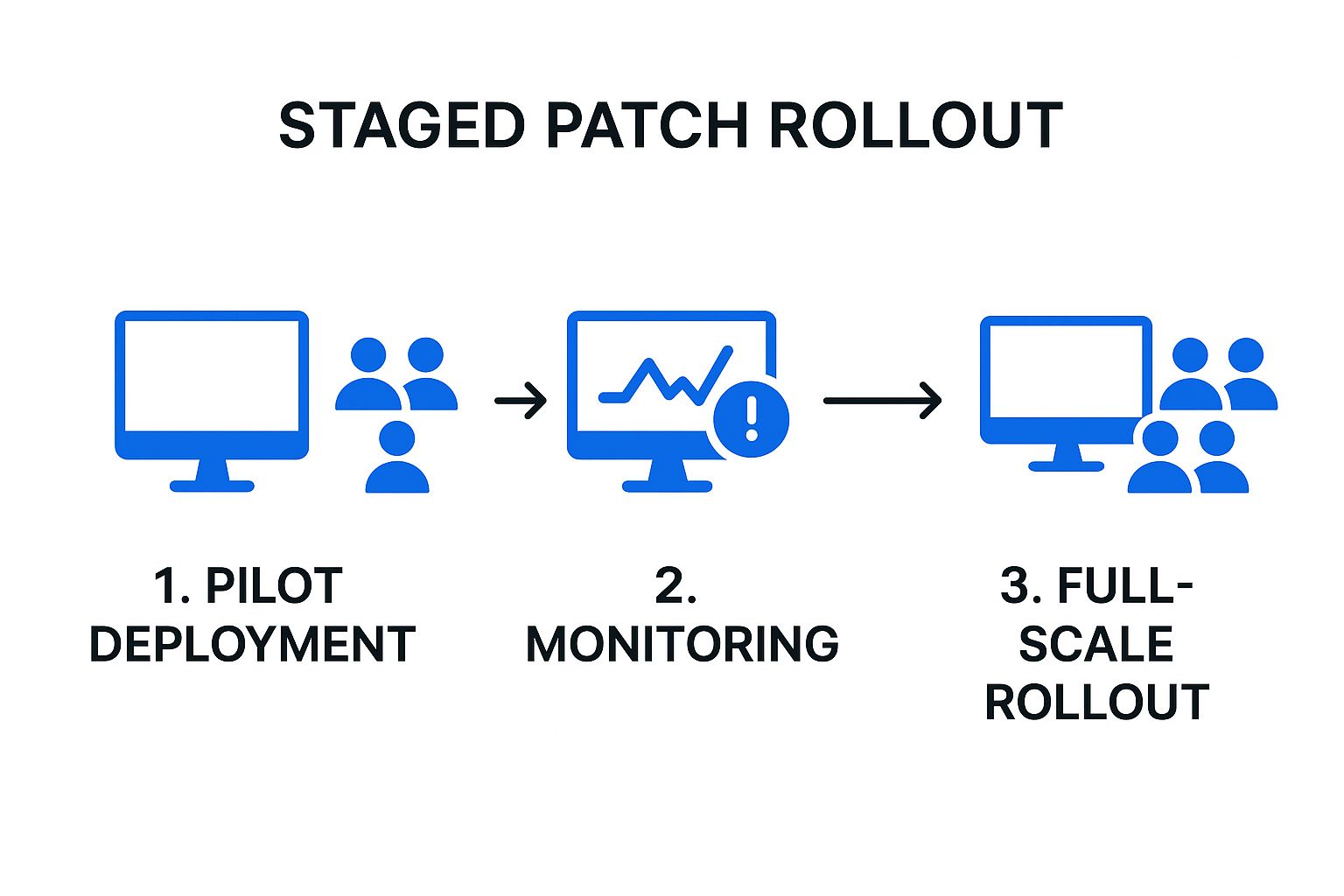
This visual process flow emphasizes the importance of the monitoring and validation step, which acts as a critical quality gate before proceeding to a wider, more impactful deployment.
5. Comprehensive Asset Inventory Management
You cannot patch what you do not know exists. This fundamental truth is why a comprehensive, real-time asset inventory is the bedrock of all effective patch management best practices. It involves maintaining a detailed catalog of every piece of hardware and software connected to your network, providing the complete visibility needed to protect your entire infrastructure.
A foundational step for any effective patch management strategy is a comprehensive asset inventory, often greatly facilitated by robust practices. This inventory goes beyond just listing devices; it tracks operating systems, software versions, configurations, physical locations, and business owners. For instance, knowing a critical server runs an outdated version of Windows Server allows you to prioritize its patches immediately. Without this detailed information, security teams are flying blind, inevitably leaving unpatched systems exposed to threats.
How to Implement Comprehensive Asset Inventory
To move from theory to practice, organizations can leverage automated discovery tools to build and maintain their inventory.
- Automated Discovery: Tools like Lansweeper or ManageEngine AssetExplorer continuously scan the network to identify and catalog all connected devices, from servers and laptops to printers and IoT sensors. This eliminates manual tracking errors and reveals unauthorized "shadow IT" assets that pose a significant security risk.
- Regular Audits: An inventory is only useful if it's accurate. Schedule regular, automated audits to validate the data, reconcile discrepancies, and confirm that all assets are accounted for. This practice ensures your patch management decisions are based on current, reliable information.
- System Integration: Integrate your inventory management system, often a Configuration Management Database (CMDB), with your patching tools and security information and event management (SIEM) systems. This creates a single source of truth that enhances decision-making across IT operations. For example, a high-severity vulnerability alert in your SIEM can be instantly cross-referenced with your CMDB, like ServiceNow's, to identify every affected machine and its owner.
6. Defined Maintenance Windows
Applying patches without a plan can cause as much disruption as the vulnerabilities they are meant to fix. This is why establishing defined maintenance windows is one of the most critical patch management best practices. It involves scheduling predetermined time slots specifically for deploying patches and performing system maintenance, minimizing the impact on core business operations.
This structured approach, heavily influenced by ITIL frameworks and concepts like Microsoft's "Patch Tuesday," ensures that security updates are applied consistently without interrupting productivity. For instance, a financial institution might schedule its patching activities during late-night weekend hours to avoid affecting trading or customer transactions. Similarly, an e-commerce platform would avoid deploying updates during peak holiday shopping seasons. This balance between security and operational uptime is essential.
How to Implement Defined Maintenance Windows
Effectively implementing maintenance windows requires careful planning, communication, and coordination across the organization.
- Align with Business Cycles: Analyze your business's operational tempo. Identify periods of low activity, such as overnight hours, weekends, or specific days of the month. Use this data to create a recurring maintenance schedule that aligns with your unique business rhythm and minimizes disruption.
- Communicate Proactively: Announce the maintenance schedule well in advance to all stakeholders, from end-users to department heads. Use multiple channels like email, intranet portals, and team meetings to ensure everyone is aware. Clear communication prevents confusion and helps manage expectations.
- Plan for Emergencies: While scheduled windows are ideal for routine patches, you must have a separate, expedited process for out-of-band emergency patches that address zero-day vulnerabilities. This process should allow for immediate action while still notifying key personnel.
- Document and Review: Maintain a detailed log of all activities performed during each maintenance window, including patches applied, systems affected, and any issues encountered. Regularly review these logs and the effectiveness of your windows with a Change Advisory Board (CAB) or similar governing body to refine your strategy over time.
7. Rollback and Recovery Planning
Even the most thoroughly tested patch can introduce unforeseen problems, from system instability and application conflicts to complete service outages. This is why a robust rollback and recovery plan is a non-negotiable component of any mature patch management best practices framework. It provides a safety net, enabling your organization to quickly undo a failed deployment and restore systems to a stable, pre-patch state with minimal business disruption.
A successful patch management strategy must account for failure. Developing comprehensive procedures to reverse problematic deployments is as crucial as the deployment itself. These plans should be integrated into a larger framework for operational resilience, similar to the strategies outlined in a comprehensive business continuity plan. By preparing for the worst-case scenario, you can minimize downtime, protect data integrity, and maintain user confidence even when patches go wrong.
How to Implement Rollback and Recovery Planning
Building an effective rollback capability requires proactive planning and the right combination of tools and documented procedures.
- Utilize System Snapshots and Backups: Before deploying patches, especially to critical systems, create full system backups or virtual machine snapshots. Tools like VMware vSphere or native cloud provider services (AWS, Azure) allow for near-instant reversion to a pre-patch state, turning a potential disaster into a minor setback.
- Leverage Configuration Management: Employ configuration management tools like Ansible or Puppet to codify system states. These tools can not only apply patches but also revert systems to a previous known-good configuration by reapplying an older version of the configuration code, ensuring a consistent and automated rollback process.
- Document and Test Procedures: A plan that hasn't been tested is merely a theory. Clearly document every step of the rollback procedure for different system types (e.g., servers, databases, applications). Regularly conduct recovery drills to ensure the process works as expected and that your IT team can execute it efficiently under pressure. Establish clear triggers, such as specific error rates or performance degradation thresholds, that automatically initiate a rollback decision.
8. Continuous Monitoring and Reporting
Patch deployment is not the end of the story; it's a critical milestone in an ongoing cycle. Continuous monitoring and reporting are essential patch management best practices that provide the necessary oversight to confirm that patches are not just deployed, but are working as intended without causing new issues. This practice involves establishing real-time visibility into your patch status, system health, and overall security posture.

Effective monitoring transforms your patch management from a reactive, task-based process into a proactive, data-driven strategy. By tracking key metrics and generating tailored reports, you can prove compliance, identify weak points, and continuously refine your approach. For a deeper understanding of its importance, you can learn more about how continuous monitoring is a cybersecurity must. This visibility is crucial for demonstrating due diligence to auditors and reassuring leadership that security investments are paying off.
How to Implement Continuous Monitoring and Reporting
Implementing a robust monitoring framework involves defining what you need to track and leveraging tools to automate the process.
- Define Key Performance Indicators (KPIs): Establish clear metrics to measure success. These should include patch compliance rates, mean time to patch (MTTP) for critical vulnerabilities, the number of failed deployments, and post-patch system uptime. These KPIs provide a baseline to measure improvement.
- Leverage Monitoring and Reporting Tools: Use platforms like Splunk or SolarWinds to create dashboards that visualize patch deployment progress across the enterprise. Tools such as Nagios can be configured to monitor system health immediately after patching, alerting your team to performance degradation or service outages.
- Tailor Reports for Different Audiences: Create different versions of reports for different stakeholders. Technical teams need granular data on failed patches and system errors. In contrast, executives and department heads need high-level summaries that show overall compliance percentages, risk reduction, and trends over time, often visualized through tools like PowerBI.
Patch Management Best Practices Comparison
| Item | Implementation Complexity 🔄 | Resource Requirements ⚡ | Expected Outcomes 📊 | Ideal Use Cases 💡 | Key Advantages ⭐ |
|---|---|---|---|---|---|
| Automated Patch Management Systems | High – setup and integration needed | High – infrastructure and tools | Consistent, fast patch deployment; reduced manual errors | Large enterprises with complex IT environments | Scalable, reduces manual work, faster response to threats |
| Risk-Based Patch Prioritization | Medium to High – requires complex asset & threat analysis | Medium – asset inventory & intelligence feeds | Efficient resource allocation; focus on critical risks | Organizations with limited resources seeking risk focus | Optimizes patch efforts, aligns with business priorities |
| Comprehensive Testing Environment | High – infrastructure replication & maintenance required | High – dedicated test environments | Minimized production disruptions; early issue detection | Businesses with high stability requirements and compliance | Prevents downtime, builds deployment confidence |
| Staged Rollout Strategy | Medium – detailed planning and coordination | Medium – monitoring and phased deployment | Controlled deployment pace; early detection of failures | Enterprises deploying widely across diverse systems | Limits impact of faulty patches, supports controlled release |
| Comprehensive Asset Inventory Management | Medium – ongoing maintenance and data accuracy needed | Medium – discovery and tracking tools | Full visibility of IT assets; improved impact assessment | Organizations needing exact asset oversight | Enhances compliance and planning capabilities |
| Defined Maintenance Windows | Low to Medium – scheduling and coordination | Low to Medium – planning and communication | Reduced business disruption; aligned resources | Businesses balancing uptime with patching needs | Minimizes downtime, improves stakeholder coordination |
| Rollback and Recovery Planning | Medium – requires automation and backup setups | Medium – backup storage and validation | Minimized impact from faulty patches; faster recovery | Environments where uptime and data integrity are critical | Reduces downtime, increases patch deployment confidence |
| Continuous Monitoring and Reporting | Medium – tool investment and data analysis skills | Medium – monitoring systems and dashboards | Real-time visibility; proactive issue identification | Organizations requiring compliance and ongoing oversight | Enables continuous improvement and compliance reporting |
Unify Your Defenses with an Integrated Patching Strategy
Navigating the landscape of cybersecurity can feel like a constant battle, but mastering patch management provides a powerful, proactive shield for your organization. The best practices detailed in this article are not isolated tasks; they are interconnected components of a single, robust defensive strategy. From establishing a comprehensive asset inventory to implementing automated systems and staged rollouts, each step builds upon the last to create a resilient and secure IT environment.
The core takeaway is that effective patch management is a continuous cycle, not a one-time project. It requires a strategic blend of technology, process, and planning. By embracing a risk-based approach to prioritization, you ensure that your most critical vulnerabilities are addressed first, maximizing your security posture with finite resources. Similarly, creating detailed rollback plans and maintaining a dedicated testing environment transforms patching from a high-stakes gamble into a predictable, controlled procedure.
From Theory to Action: Your Next Steps
To translate these concepts into tangible results, focus on creating a unified framework. The goal is to move away from reactive, chaotic patching and toward a streamlined, strategic operation.
Here are your actionable next steps:
- Audit Your Current Process: Begin by evaluating your existing patch management workflow against the best practices discussed. Identify the most significant gaps, whether in asset visibility, testing protocols, or reporting.
- Prioritize Automation: If you are still managing patches manually, investigating an automated solution should be your top priority. This single change will free up valuable time and dramatically reduce the risk of human error.
- Develop a Formal Policy: Document everything. Create a formal patch management policy that outlines roles, responsibilities, timelines, and procedures for prioritization, testing, and deployment. This document will serve as your organization’s single source of truth.
The Lasting Impact of Proactive Patching
Ultimately, adopting these patch management best practices does more than just close security loopholes. It builds a foundation of operational excellence and digital trust. For businesses in Utah and beyond, from healthcare practices needing HIPAA compliance to multi-location franchises requiring centralized control, a mature patching strategy is a competitive advantage. It minimizes downtime, protects sensitive data, and demonstrates a commitment to security that resonates with clients and partners alike. By treating patch management as the critical business function it is, you fortify your defenses and empower your organization to thrive securely in an ever-evolving digital world.
Is your organization struggling to keep up with the constant cycle of updates and vulnerabilities? InfoTech Enterprise Solutions provides managed IT services that implement these exact patch management best practices, ensuring your systems are secure, compliant, and always optimized. Let our experts handle the complexities of patch management so you can focus on growing your business. InfoTech Enterprise Solutions


Leave a Reply