Email remains the number one attack vector for cybercriminals targeting small and mid-sized enterprises (SMEs). From sophisticated phishing scams that harvest credentials to devastating ransomware attacks, a single compromised inbox can halt operations, expose sensitive client data, and permanently erode customer trust. Many businesses operate with a false sense of security, believing their default email filters are sufficient protection. In the current threat environment, this is a dangerous and costly assumption.
This guide provides a definitive roundup of the top nine email security best practices your SME must implement to build a resilient defense. We move beyond generic advice to offer actionable strategies, specific technical guidance, and real-world examples that form a multi-layered security posture. These practices are essential for safeguarding your organization's primary communication channel and protecting your bottom line. While this article focuses specifically on email, a robust security strategy requires a holistic approach. For a broader perspective on safeguarding all your digital assets, explore comprehensive Cybersecurity Best Practices for Small Businesses tailored to your operational needs.
You will learn how to implement non-negotiable security controls, covering everything from foundational technical configurations like Multi-Factor Authentication (MFA) and DMARC to the critical human element of security awareness training. This article serves as a comprehensive roadmap, whether you are strengthening an existing framework or building one from the ground up. Let's dive into the essential practices that will secure your communications.
1. Multi-Factor Authentication (MFA) for Email Accounts
Of all the email security best practices available, implementing Multi-Factor Authentication (MFA) provides one of the most significant security boosts for the effort involved. MFA creates a layered defense, making it much harder for an attacker to gain access to your email accounts, even if they have managed to steal a user's password. It works by requiring two or more verification factors to log in, combining something you know (like a password) with something you have (like a smartphone app or hardware token).

The impact of MFA is not just theoretical; it's proven. Microsoft reported that enabling MFA blocks 99.9% of automated account compromise attacks. This single control acts as a powerful deterrent against a wide range of common threats, from phishing to brute-force attacks.
How to Implement MFA Effectively
Successfully rolling out MFA requires more than just flipping a switch. Follow these actionable steps to ensure a smooth and secure deployment for your organization.
- Prioritize High-Risk Accounts: Begin your MFA rollout with administrative, executive, and privileged accounts. These accounts are the most valuable targets for attackers and securing them first provides the biggest immediate risk reduction.
- Choose the Right Authentication Method: While SMS-based MFA is better than none, it is vulnerable to SIM-swapping attacks. Whenever possible, guide users to use more secure methods like authenticator apps (e.g., Google Authenticator, Microsoft Authenticator) or physical security keys (e.g., YubiKey). You can explore a detailed comparison to find the most secure and convenient form of MFA for your business needs.
- Develop Clear User Training: Provide simple, step-by-step instructions and short video tutorials for setting up MFA. Conduct training sessions to answer questions and demonstrate the process, ensuring your team feels confident and understands the "why" behind the new policy.
- Establish a Backup Plan: Instruct users to generate and securely store their one-time backup codes. These codes are crucial for account recovery if a user loses their primary authentication device. Store them in a password manager or a secure physical location, not on the computer itself.
By making MFA a mandatory component of your security posture, you drastically raise the bar for attackers, protecting your sensitive business communications and data.
2. Email Encryption (End-to-End and Transport Layer)
While passwords and MFA protect access to an account, email encryption protects the content of your messages themselves from being read by unauthorized parties. It's a critical email security best practice for safeguarding sensitive information as it travels across the internet and rests on servers. Encryption comes in two primary forms: Transport Layer Security (TLS), which protects data in transit, and end-to-end encryption, which secures a message from the sender all the way to the recipient.
Implementing encryption is essential for compliance in many industries, such as healthcare organizations using S/MIME or PGP to meet HIPAA requirements. It's also a standard for financial institutions and law firms that must protect confidential client communications from interception. To fully grasp email encryption, it's beneficial to first understand the basic principles of encryption and how it transforms readable data into an unreadable format.
How to Implement Email Encryption Effectively
Deploying encryption requires a strategic approach to ensure it's used correctly and consistently. Follow these steps to build a robust encryption framework for your business communications.
- Mandate Transport Layer Security (TLS): Configure your email server to use and require TLS for all incoming and outgoing mail. This is a foundational step that encrypts the connection between email servers, preventing eavesdropping as messages are transmitted. Most modern email providers, like Microsoft 365 and Google Workspace, enable this by default, but it's crucial to verify the settings.
- Implement End-to-End Encryption for Sensitive Data: For highly sensitive information, such as financial records or patient data, use an end-to-end encryption solution like S/MIME or PGP. You can also leverage email gateway solutions that automatically encrypt messages containing specific keywords (e.g., "Social Security Number," "account number") or messages sent to certain domains.
- Train Users on Proper Usage: Your team must know when and how to use encryption. Provide training on initiating an encrypted message, managing encryption keys, and verifying a recipient's identity. Explain the importance of not sending sensitive data over unencrypted channels.
- Establish Key and Certificate Management: For methods like S/MIME, you will need a process for issuing, renewing, and revoking digital certificates. Using a trusted Certificate Authority (CA) simplifies this deployment and ensures the authenticity of your users' digital identities. You can explore a variety of encryption methods and their use cases to find the best fit for your organization.
By integrating both transport layer and end-to-end encryption, you create a comprehensive defense that protects your sensitive data both in transit and at rest, maintaining confidentiality and trust.
3. Advanced Email Filtering and Anti-Spam Protection
While your email provider's built-in spam filter catches obvious junk mail, it's often not enough to stop sophisticated phishing and malware attacks. Advanced email filtering services act as a powerful security gateway, using machine learning, sender reputation analysis, and behavioral heuristics to identify and quarantine threats before they ever land in a user's inbox. These systems are a critical component of a layered email security best practices strategy.
Modern solutions from providers like Proofpoint, Mimecast, and Microsoft Defender for Office 365 can analyze email headers, content, attachments, and embedded links with incredible accuracy. For example, some systems can execute links and attachments in a sandboxed environment to observe their behavior safely. This proactive approach identifies zero-day threats and targeted attacks that bypass traditional signature-based detection.
The infographic below highlights the typical performance metrics of a well-configured advanced email filtering solution.
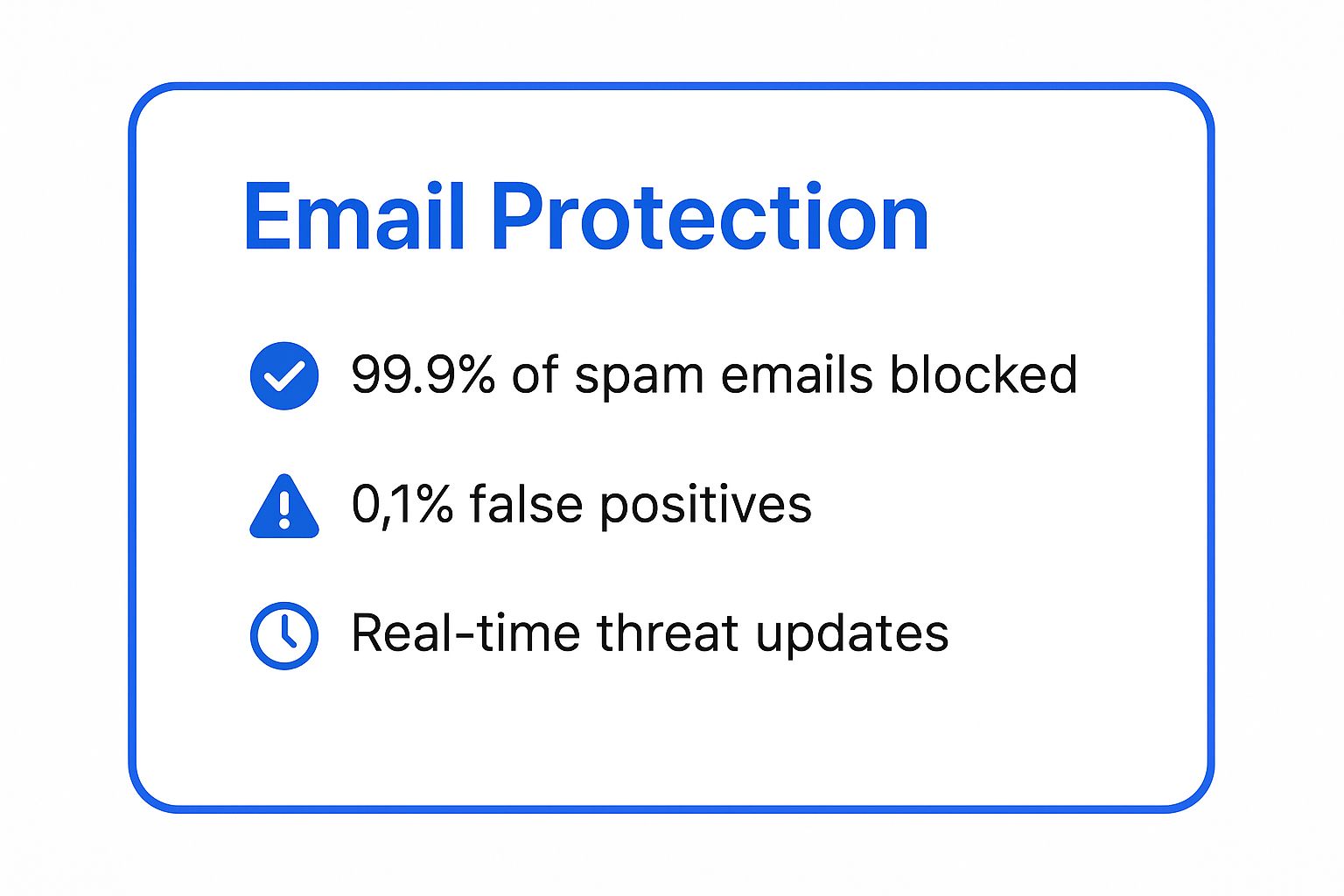
These figures demonstrate the dual benefit of high threat detection rates combined with minimal disruption to legitimate business communication, powered by continuous threat intelligence.
How to Implement Advanced Filtering Effectively
Deploying an advanced filtering solution requires careful configuration and ongoing management to maximize its protective capabilities.
- Implement a Defense-in-Depth Model: Don't rely on a single filtering layer. Use a dedicated third-party gateway in addition to the security features included with your email platform (e.g., Microsoft 365 or Google Workspace). This creates multiple checkpoints for incoming threats.
- Customize and Tune Filtering Rules: Your business has unique communication patterns. Work with your IT provider to adjust filtering policies based on your industry, common senders, and risk tolerance. Regularly review quarantined emails to fine-tune rules and release any false positives.
- Leverage Threat Intelligence Feeds: Ensure your solution is integrated with real-time threat intelligence feeds. This allows the system to be updated instantly with information about new phishing campaigns, malicious domains, and emerging malware, providing proactive protection.
- Empower Users to Report Misses: No system is perfect. Train employees on how to report suspicious emails that bypass the filter. Most modern solutions offer a simple "report phishing" button that not only removes the email but also feeds the data back into the system to improve future detection.
4. Email Authentication Protocols (SPF, DKIM, DMARC)
While many email security best practices focus on protecting your inbox from incoming threats, it's equally crucial to protect your domain from being used by attackers. Email authentication protocols like SPF, DKIM, and DMARC are the industry standards for verifying that an email genuinely comes from your domain, preventing spoofing and protecting your brand reputation. They work together to build a chain of trust that mail servers use to validate legitimate messages.
SPF (Sender Policy Framework) specifies which mail servers are authorized to send email on behalf of your domain. DKIM (DomainKeys Identified Mail) adds a cryptographic signature to emails, which receiving servers can verify to ensure the message hasn't been altered in transit. DMARC (Domain-based Message Authentication, Reporting & Conformance) ties SPF and DKIM together, instructing receiving servers on how to handle emails that fail these checks.
The power of these protocols is well-documented. For instance, after fully implementing DMARC, PayPal saw a dramatic reduction in phishing attempts spoofing its domain. Similarly, the U.S. government mandated DMARC for all federal domains, significantly hardening its agencies against email-based attacks and fraud.
How to Implement Authentication Protocols Effectively
Properly configuring these DNS records is a sequential process that solidifies your domain's security posture. Follow these steps to implement them correctly.
- Implement Sequentially: Start by creating an SPF record. Once that is in place, add DKIM signatures. Only after both are working correctly should you implement DMARC. This layered approach minimizes the risk of legitimate emails being rejected.
- Start DMARC in Monitoring Mode: Begin with your DMARC policy set to
p=none. This setting allows you to receive reports on which emails are passing or failing authentication checks without impacting email delivery. It's a critical first step for auditing all legitimate sending sources. - Analyze and Authorize: Use the data from DMARC reports to identify all services sending email on your behalf (e.g., marketing platforms, CRM systems, support desks). Ensure every legitimate source is properly included in your SPF and DKIM configurations.
- Gradually Enforce Policy: Once you are confident that all legitimate mail is authenticating correctly, you can slowly escalate your DMARC policy to
p=quarantine(sends failed emails to spam) and eventually top=reject(blocks failed emails entirely). To further enhance email authentication and prevent domain spoofing, setting up DMARC is crucial. Learn more about a simple DMARC configuration to streamline this process.
By systematically deploying SPF, DKIM, and DMARC, you take control of your domain's email identity, making it exponentially harder for cybercriminals to impersonate your business.
5. Regular Security Awareness Training and Phishing Simulations
While technical controls are crucial, the human element remains a primary target for cybercriminals. Regular security awareness training and phishing simulations directly address this vulnerability, transforming employees from a potential weak link into an active line of defense. This approach educates users on current email threats and safe online practices, then tests their knowledge in a controlled environment, reinforcing learning and measuring improvement over time.

The data overwhelmingly supports this human-centered strategy. Companies like KnowBe4, pioneered by the late Kevin Mitnick, have shown that an initial phishing-prone percentage of over 30% can be reduced to under 5% within a year of consistent training. This significant reduction in click rates is a testament to how effective user education is as one of the core email security best practices.
How to Implement Training and Simulations Effectively
A successful awareness program is more than an annual presentation. It requires a continuous, engaging, and data-driven approach to truly change user behavior and bolster your company's security culture.
- Start with a Baseline Test: Before initiating any training, run a baseline phishing simulation. This measures your organization's initial susceptibility and provides a clear metric to demonstrate ROI and track progress over time.
- Provide Immediate, Point-of-Failure Training: When a user clicks a simulated phishing link, don't just record the failure. Immediately present them with a short, targeted training module explaining the red flags they missed. This "teachable moment" is highly effective for retention.
- Keep Content Relevant and Engaging: Use real-world examples and current events in your simulations and training materials. Incorporate gamification elements like leaderboards or badges to make the training more engaging and less of a chore.
- Reward Good Behavior, Don't Just Punish: Acknowledge and reward employees who consistently identify and report real or simulated phishing attempts. A positive reinforcement culture encourages proactive security participation far more than a punitive one.
6. Email Backup and Disaster Recovery Planning
While preventing attacks is crucial, a robust email security strategy must also account for a worst-case scenario. Email backup and disaster recovery planning ensures business continuity by maintaining secure, accessible copies of email data. This practice creates a vital safety net against data loss from ransomware attacks, accidental deletions, hardware failures, or natural disasters, allowing you to restore services and data quickly.
Many businesses mistakenly assume their cloud email provider, like Microsoft 365, handles comprehensive backups for them. In reality, their responsibility often ends at service uptime, not granular, long-term data recovery. This shared responsibility model means it's up to you to protect your own data. The City of Atlanta, for example, successfully leveraged its backups to recover critical services after a devastating ransomware attack, highlighting the importance of a prepared recovery strategy.
How to Implement Email Backup and Recovery Effectively
A solid backup plan is more than just copying files; it's a structured process that ensures data is both safe and restorable when you need it most.
- Follow the 3-2-1 Backup Rule: This is the gold standard for data protection. Maintain at least three copies of your email data on two different media types (e.g., local server and cloud storage), with at least one copy stored off-site. This diversification protects against localized disasters like fire or theft.
- Test Your Recovery Procedures Regularly: A backup is useless if you can't restore from it. Schedule quarterly or semi-annual tests to run through a full recovery drill. This verifies the integrity of your backups and ensures your IT team is prepared to act swiftly during a real emergency.
- Integrate Email into Your DR Plan: Don't treat email as a separate entity. Your overall business disaster recovery (DR) plan must include specific steps, responsibilities, and timelines for restoring email services. Document everything, from who to contact to the step-by-step technical procedures.
- Consider Third-Party Backup Solutions: Specialized services like Acronis Cyber Backup or solutions from Veeam and Barracuda offer features beyond native tools, such as indefinite retention, point-in-time recovery, and enhanced compliance support. You can dive deeper into best practices for secure data backup to select a solution that aligns with your business needs.
By making backup and recovery a core component of your email security best practices, you build resilience and ensure that a security incident doesn't become a catastrophic business failure.
7. Secure Email Client Configuration and Updates
Beyond the server, the email client itself (like Microsoft Outlook or Apple Mail) is a critical frontline in your defense. Unsecured or outdated clients can act as an open door for malware and other exploits. Implementing secure email client configuration and mandating regular updates is a fundamental email security best practice that hardens endpoints against common attack vectors. This approach ensures that every user's access point to the email system is consistently protected.
An improperly configured client can automatically download malicious images, execute dangerous scripts, or leak sensitive information. By standardizing configurations and keeping software current, you close these vulnerabilities across your entire organization, creating a unified and resilient security posture at the user level.
How to Implement Secure Client Configurations
Enforcing consistent security settings requires a systematic approach. Follow these actionable steps to secure the email clients used by your team.
- Establish and Enforce Security Baselines: Use security benchmarks from trusted sources like the Center for Internet Security (CIS) or Microsoft's own security baselines. These guides provide detailed, step-by-step instructions for configuring clients like Outlook to disable risky features and enable protective ones. For businesses with centralized IT, use Group Policy Objects (GPOs) to deploy and enforce these settings automatically, ensuring no device is left behind.
- Disable Automatic Loading of External Content: One of the simplest yet most effective settings is to block the automatic downloading of images and other external content in emails. Attackers embed tracking pixels in images to verify that an email address is active, which can mark you for further phishing attempts. Disabling this feature forces users to consciously approve content from trusted senders, neutralizing this threat.
- Enable Automatic Updates: Most modern email clients, including those in Microsoft 365 and Google Workspace, have an automatic update feature. Ensure this is enabled for all users. Timely updates are crucial as they contain patches for newly discovered security vulnerabilities that attackers actively exploit. A single unpatched client can put the entire network at risk.
- Audit Configurations Regularly: Don't just set it and forget it. Periodically audit email client configurations across your organization to ensure they remain compliant with your security policies. These audits can identify devices that have fallen out of compliance or settings that have been inadvertently changed by users, allowing you to correct them before they become a security incident.
8. Email Monitoring and Threat Intelligence Integration
While defensive measures are crucial, you cannot protect against threats you cannot see. Proactive email monitoring, combined with threat intelligence integration, shifts your security posture from reactive to predictive. This practice involves the continuous analysis of email traffic and user behavior to spot anomalies, while threat intelligence feeds provide real-time data on new attack campaigns, malicious IPs, and emerging adversary tactics. This fusion allows you to block threats before they even reach an inbox.
Leading security providers like Cisco Talos and IBM X-Force have demonstrated the power of this approach. Their global threat intelligence networks analyze billions of emails daily, identifying new phishing kits and malware signatures in real-time. This intelligence is then pushed directly to their email security gateways, automatically updating defenses for all their customers and neutralizing attacks as they emerge.
How to Implement Email Monitoring and Threat Intelligence
Integrating these advanced capabilities is more accessible than ever for small and mid-sized businesses. Follow these steps to build a more intelligent and responsive email defense system.
- Start with Built-in and Free Feeds: Before investing in premium services, leverage the capabilities within your existing security tools. Many modern email platforms and firewalls can ingest free, open-source threat intelligence feeds. This is a cost-effective first step to enhance your situational awareness.
- Centralize Your Monitoring with SIEM: For a comprehensive view, integrate your email security logs into a Security Information and Event Management (SIEM) system. This provides a single pane of glass for correlating email-based threats with other security events across your network, helping you spot sophisticated, multi-stage attacks.
- Establish Clear Alerting and Escalation: An alert is useless without a response plan. Define clear procedures for what happens when a high-priority threat is detected. Document who needs to be notified, what immediate actions to take (e.g., isolating a user account), and how to escalate the incident if necessary.
- Regularly Tune Your Monitoring Rules: Threat intelligence is not a "set it and forget it" solution. You must regularly review and fine-tune your monitoring rules to reduce false positives and ensure you are detecting the most relevant threats to your specific industry and organization.
By actively monitoring your email environment and enriching your defenses with up-to-the-minute threat data, you transform your email security from a simple filter into an intelligent, adaptive shield.
9. Email Retention Policies and Compliance Management
Effective email security best practices extend beyond preventing attacks; they also involve managing data lifecycle and legal obligations. An email retention policy dictates how long your organization stores emails and when they are permanently deleted. This is crucial for balancing security, storage costs, and meeting complex legal and regulatory requirements like HIPAA, SOX, and GDPR. Without a formal policy, you risk storing sensitive data indefinitely, increasing your attack surface and potential legal liability.
Implementing a structured retention and compliance strategy ensures that you are not holding onto data longer than necessary, which minimizes risk in the event of a breach. At the same time, it guarantees that critical information is preserved to meet legal hold requirements for litigation or regulatory audits. Tools like Google Vault or Microsoft Exchange Online Archiving can automate this process, making compliance more manageable for businesses of all sizes.
How to Implement Email Retention Policies Effectively
A well-planned policy is the foundation of successful email data management. Follow these actionable steps to create and enforce a policy that aligns with your business needs and legal duties.
- Define Retention Schedules: Work with legal counsel to classify your data and define retention periods. For example, financial services firms may need to retain communications for seven years under SEC rules, while healthcare providers must adhere to HIPAA's six-year requirement. All other non-essential business emails might be set for deletion after one or two years.
- Automate Policy Enforcement: Relying on manual deletion is prone to human error and inconsistency. Use your email platform's built-in tools or third-party archiving solutions to automatically enforce your retention rules. This ensures policies are applied uniformly across the entire organization without user intervention.
- Document Everything and Train Your Team: Meticulously document your retention policy, the reasoning behind it, and all related procedures. This documentation is vital for demonstrating compliance during an audit. Train your legal, IT, and administrative teams on the policy specifics, including how to handle legal holds when litigation is anticipated.
- Conduct Regular Audits: Periodically review your email archives and policy enforcement to ensure they are working as intended. Audits help identify gaps, confirm compliance, and provide an opportunity to adjust the policy as business needs or regulations change. This proactive approach prevents compliance issues from escalating.
By strategically managing your email lifecycle, you reduce storage costs, minimize your data footprint, and maintain a defensible position for legal and regulatory compliance.
Email Security Best Practices Comparison
| Item | Implementation Complexity 🔄 | Resource Requirements ⚡ | Expected Outcomes 📊 | Ideal Use Cases 💡 | Key Advantages ⭐ |
|---|---|---|---|---|---|
| Multi-Factor Authentication (MFA) | Moderate – Setup of apps/tokens, user onboarding | Low to Moderate – Devices for 2nd factor, user support | Very High – Up to 99.9% reduction in account takeover | Protecting email accounts from unauthorized access | Strong account protection, audit trails, easy adoption |
| Email Encryption | High – Key management, certificate deployment | Moderate to High – Certificate infrastructure | High – Data confidentiality and compliance | Protecting sensitive communications, regulatory compliance | Ensures privacy, message integrity, compliance |
| Advanced Email Filtering & Anti-Spam | High – ML integration, continuous tuning | High – AI systems, threat intelligence feeds | Very High – Significant spam & threat reduction | Blocking phishing, malware, unwanted emails | Adaptive threat blocking, detailed reporting |
| Email Authentication Protocols | Moderate to High – DNS records, policy setup | Low – DNS and mail server configurations | High – Reduced spoofing, improved deliverability | Preventing spoofing & phishing on domain | Improves trust, visibility, phishing reduction |
| Security Awareness Training | Low to Moderate – Content creation, campaign management | Low to Moderate – Training platforms, user time | Moderate to High – Reduced phishing success | Human factor security, phishing resistance | Measurable user improvement, cultural change |
| Email Backup & Disaster Recovery | High – Backup systems, storage management, recovery testing | High – Storage, backup infrastructure | High – Data recovery and continuity | Business continuity, ransomware recovery | Protects against data loss, legal compliance |
| Secure Email Client Configuration | Moderate – Policy enforcement, patch management | Low to Moderate – IT management | Moderate to High – Reduced client vulnerabilities | Enterprise user endpoint security | Consistent security settings, automated updates |
| Email Monitoring & Threat Intelligence | High – Analytics, integration with threat feeds | High – Monitoring tools, skilled analysts | High – Rapid threat detection and response | Proactive threat hunting and incident response | Actionable intelligence, forensic capabilities |
| Email Retention & Compliance | Moderate to High – Policy setup, auditing tools | Moderate – Storage and compliance resources | High – Regulatory compliance, legal protection | Legal hold, e-discovery, regulatory compliance | Reduces risk, manages data lifecycle, audit ready |
From Best Practices to Bulletproof Defense
Navigating the landscape of modern digital communication can feel like traversing a minefield. Threats are sophisticated, relentless, and constantly evolving. However, by embracing the comprehensive framework we've detailed, you transform your approach from passive defense to proactive, resilient security. The journey to securing your organization's most critical communication channel isn't about implementing a single, magical solution. Instead, it's about methodically layering distinct, powerful controls that work in concert to create a formidable barrier against cyberattacks.
We've covered the essential pillars of a modern security strategy, moving from foundational technical controls to the critical human element. Implementing robust email authentication protocols like SPF, DKIM, and DMARC is no longer optional; it's the bedrock of proving your identity and preventing spoofing. Layering on Multi-Factor Authentication (MFA) creates an immediate, high-impact defense against credential theft, while end-to-end and transport-layer encryption ensures your sensitive data remains confidential, whether at rest or in transit. These are the non-negotiable technical defenses that form your perimeter.
From Technology to Team: Building a Culture of Security
Beyond the purely technical, we explored how to fortify your organization from within. Advanced email filtering acts as your vigilant, automated guard, inspecting inbound traffic for malware, spam, and sophisticated phishing attempts. But no filter is infallible. This is why regular, engaging security awareness training is perhaps the most crucial investment you can make. When you empower your employees to recognize and report suspicious activity through realistic phishing simulations, you convert a potential vulnerability into your most dynamic and intelligent defense sensor. This human firewall, when properly trained and supported, can catch threats that technology alone might miss.
Finally, we addressed the strategic policies that underpin a truly mature security posture. Secure client configurations, diligent patching, and proactive email monitoring provide ongoing protection and visibility. Meanwhile, well-defined email retention and disaster recovery plans ensure that you remain compliant with industry regulations and can bounce back quickly from any incident, minimizing operational disruption and data loss.
Your Actionable Path Forward
The true value of these email security best practices is realized not when they are simply known, but when they are integrated into the very fabric of your daily operations. This isn't a "set it and forget it" task but a continuous cycle of implementation, monitoring, and refinement.
Your immediate next steps should be to:
- Conduct an Audit: Assess your current email security posture against the nine practices discussed. Where are your biggest gaps?
- Prioritize Implementation: Start with the highest-impact items. For most businesses, this means deploying MFA and configuring DMARC immediately.
- Engage Your Team: Launch or refresh your security awareness training program. Make it an ongoing, positive part of your company culture.
- Seek Expertise: Don't go it alone. The complexity of managing these interconnected systems can overwhelm internal teams, pulling focus from core business activities.
Implementing this multi-layered defense is the definitive way to protect your business's data, finances, and reputation. It's how you build trust with clients in industries from healthcare to manufacturing and ensure your operations remain secure and resilient in an uncertain digital world.
Don't let the complexity of cybersecurity slow your business down. Partner with InfoTech Enterprise Solutions to implement and manage these critical email security best practices as part of our all-inclusive managed IT services. We provide the enterprise-grade expertise and 24/7 monitoring Utah businesses need to stay secure and focused on growth.


Leave a Reply