
So, how does a firewall actually work? Let's cut right to it.
Imagine a bouncer at a club. They have a strict guest list and a set of rules: no trouble, right dress code. They stand at the only door, checking everyone who tries to get in or out. A firewall is your network's digital bouncer, standing guard between your private business network and the wide-open internet.
It scrutinizes every piece of data trying to cross its path, deciding whether to let it through or turn it away based on a security rulebook you define.
What Is a Firewall and How Does It Protect You?

At its heart, a firewall is a network security system designed to be the first line of defense against digital threats. Its main job is to create a secure barrier between a trusted network (like your office computers) and an untrusted one, which is usually the internet.
This isn't about blindly blocking traffic; it's about intelligent filtering. The firewall examines data packets—small chunks of data that make up all internet communication—and checks them against its rule set. If a packet's credentials match the rules, it's allowed in. If not, it's blocked. Simple as that.
To give you a clearer picture, let's break down the firewall's primary duties into its three core functions.
The 3 Core Functions of a Firewall
A firewall is much more than a simple gate. It’s a dynamic system constantly working to protect your network.
- Filtering Traffic: The firewall inspects data based on its origin, destination, and the digital "port" it's trying to use. Anything that looks suspicious or doesn't have the right credentials gets dropped.
- Preventing Unauthorized Access: It essentially makes your computers invisible to the public internet. This is a big deal. If hackers can't find your devices, they can't attack them.
- Blocking Malicious Traffic: Many modern firewalls can spot and stop traffic linked to known malware, viruses, and phishing schemes before they ever have a chance to infect your systems.
These functions work together to create a robust security perimeter. To quickly summarize these key responsibilities, here’s a simple table.
Firewall Core Functions at a Glance
| Function | Description | Analogy |
|---|---|---|
| Traffic Filtering | Examines data packets against a set of security rules to permit or deny access. | A mail sorter checking the address on every package before delivery. |
| Preventing Access | Hides the network from external threats, making it difficult for attackers to find. | Giving your house an unlisted address so strangers can't find it. |
| Blocking Threats | Identifies and stops known malicious software and attack patterns in real-time. | A security camera with facial recognition that flags known criminals. |
Ultimately, the firewall's job is to enforce the access rules you set. It makes sure only the good, authorized traffic gets in or out.
Key Takeaway: A firewall's fundamental purpose is to enforce access policies. It ensures only legitimate and authorized communications can flow, creating a secure perimeter around your network.
Of course, a firewall on its own isn't a silver bullet. It's a critical, foundational component of a comprehensive cyber security risk management strategy. When combined with other security measures, it forms a powerful defense to safeguard your business's most valuable assets.
The Evolution of Firewalls: From Simple Filters to Smart Guardians

To really get a handle on modern firewalls, it helps to look back at how they grew up. This isn't just a dry timeline of technology. It’s the story of a constant cat-and-mouse game between network defenders and ever-smarter cyber threats. Every new feature we have today was born out of necessity, a direct response to attackers finding a new way to get in.
The story starts in the late 1980s with the very first generation: packet-filtering firewalls. Their job was simple and direct. Think of them as a bouncer at a club door with a very basic guest list. They'd look at the header of a data packet—its source and destination IP address, the port it was headed for—and decide if it was on the list.
It was a decent first line of defense against straightforward attacks, but it had a massive blind spot. This bouncer couldn't tell if someone on the list was actually there to cause trouble. It had no concept of the bigger picture.
The Rise of Smarter Inspection
As the internet exploded in popularity, so did the sophistication of attacks. Hackers quickly learned how to make malicious traffic look legitimate on the surface, slipping right past the simple checks of those early firewalls. This new reality demanded a major upgrade in security, giving rise to stateful inspection firewalls.
This second generation was a whole lot smarter. Instead of looking at each packet in isolation, these firewalls started tracking the entire "state" of a connection from beginning to end. They kept a table of active, approved conversations. This meant they knew which packets belonged to a legitimate, ongoing session, making it incredibly difficult for an attacker to hijack or inject rogue data into that conversation.
It was a huge leap forward, but the game wasn't over. Attackers just changed their tactics again, this time hiding their malware inside the content of the data packets—an area stateful firewalls weren't designed to inspect. The evolution had to continue.
Today's Intelligent Security Guardians
This back-and-forth battle has led us to the powerful tools we rely on now. As cyber threats became more complex, the technology evolved into what we call Next-Generation Firewalls (NGFWs). These aren't just filters; they are multi-layered security platforms that combine traditional firewalling with intrusion prevention systems and application-level awareness. The market for these advanced tools is booming, as detailed in research on NGFW market growth.
An NGFW is like a high-tech security guard who not only checks your ID but also scans your bag's contents and knows exactly which floors and departments you're authorized to access.
Modern NGFWs can perform Deep Packet Inspection (DPI), essentially opening up each packet to look for malicious code or sensitive data trying to sneak out. They are also hooked into global threat intelligence feeds, constantly receiving updates on the latest viruses, attack signatures, and malicious domains. This allows them to proactively block brand-new threats, making them an indispensable part of modern business security.
Exploring the Main Types of Firewalls
Not all firewalls are created equal. Just like you'd have different kinds of security for a nightclub versus a top-secret government facility, firewalls come in several distinct flavors. Each type offers a different level of inspection and protection, and knowing the difference is crucial for picking the right one for your business.
Let’s walk through the most common types, starting with the basics and working our way up to the heavy hitters.
H3: Packet-Filtering Firewalls
The original firewall, and the simplest of the bunch, is the packet-filtering firewall. Think of it as a bouncer at a club who only checks IDs. It looks at the surface-level details of each data packet—things like the source and destination IP address and the port number—and checks them against a simple list of rules.
If the packet’s information matches an "allow" rule, it gets in. If not, it’s bounced. The process is incredibly fast and light on resources, which is its main appeal. The glaring weakness, however, is that it never looks inside the packet. The bouncer checks the ID but has no idea if the person is carrying something they shouldn't be.
H3: Stateful Inspection Firewalls
Next up are stateful inspection firewalls, which were a huge leap forward. Instead of looking at every packet in a vacuum, a stateful firewall tracks the entire "state" of a connection from start to finish. It essentially keeps a running tab of all legitimate, active conversations happening through it.
Let's go back to our bouncer analogy. This time, the bouncer not only checks your ID at the door but also remembers you and your friends came in together. If a stranger tries to join your table claiming to be with you, the bouncer knows something is off because they weren't part of the original group. This context-aware security is far more effective than basic packet filtering and doesn't create a major performance bottleneck.
H3: Proxy Firewalls
A proxy firewall, sometimes called an application-level gateway, takes a completely different approach. It acts as a dedicated middleman between your internal network and the wild west of the internet. When a user tries to access a website, the proxy firewall intercepts the request and makes a separate, new connection to the website on the user's behalf.
This means no traffic ever flows directly between your computer and the external server. It’s like having a personal assistant who receives all your mail, opens it in a separate room to check for anything dangerous, and only then brings you the safe contents. Because it operates at the application layer (handling specific protocols like HTTP or FTP), it provides extremely deep inspection but can sometimes slow things down.
By its very nature, a proxy firewall conceals your internal IP addresses from the public internet. This adds a powerful layer of anonymity and security, making it much harder for attackers to map out your internal network.
H3: Next-Generation Firewalls (NGFWs)
This brings us to the modern gold standard for business security: Next-Generation Firewalls (NGFWs). These powerhouses bundle the capabilities of all the previous types and then add several more layers of intelligence and control into one device.
NGFWs are multi-talented security platforms. Their key features usually include:
- Deep Packet Inspection (DPI): They don't just glance at the packet's label; they open it up and inspect the actual data inside for malicious code or policy violations.
- Intrusion Prevention Systems (IPS): They are armed with knowledge of thousands of known cyberattack techniques and can proactively identify and block them in real-time.
- Application Awareness: NGFWs can see what applications people are using, not just the ports they're on. This allows you to create rules like, "Allow access to Salesforce, but block Facebook and YouTube."
This image clearly shows how the inspection method gets deeper and more effective as firewalls have evolved.
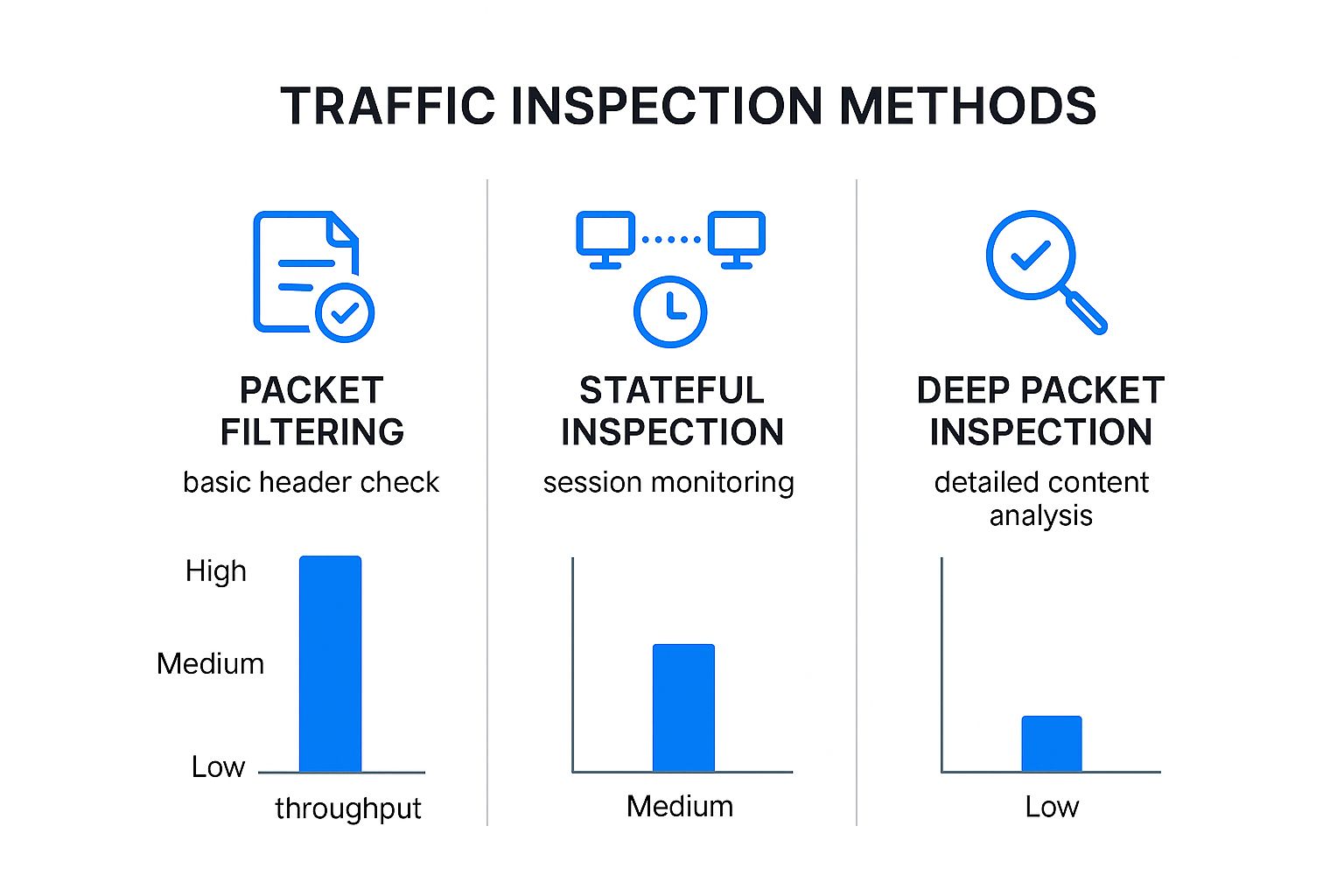
Ultimately, as the inspection gets more thorough, the security gets stronger. While this requires more processing power, NGFWs provide the most complete picture by understanding not just where traffic is going, but what it is and what its intentions are.
H3: Comparison of Key Firewall Types
To make the differences even clearer, here's a side-by-side look at how these firewalls stack up against each other.
| Firewall Type | Inspection Method | Primary Use Case | Key Weakness |
|---|---|---|---|
| Packet-Filtering | Examines packet headers (IP, port) | Basic, high-speed filtering in routers or simple networks | No awareness of connection state or packet content |
| Stateful Inspection | Tracks the state of active connections | Standard for most small to mid-sized business networks | Can't identify malicious content within allowed packets |
| Proxy Firewall | Acts as an intermediary, inspecting application-layer traffic | Securing specific web or application traffic | Can cause performance latency and compatibility issues |
| NGFW | Multi-layered; combines stateful, DPI, IPS, and application awareness | All-in-one security for modern business networks | Higher cost and complexity to configure and manage |
Choosing the right type depends on your specific security needs, budget, and the complexity of your network.
Getting a handle on these firewall types is a fundamental step in building a strong security posture. To dig deeper into how you can proactively find and fix vulnerabilities, check out our guide on what is Threat Exposure Management (TEM).
How Firewalls Are Deployed: Hardware, Software, and Cloud

To really get a handle on how a firewall works, you need to look beyond its type and understand where it operates. A firewall isn't a single, one-size-fits-all concept. It can be a physical box humming away in your server closet, a program running on your computer, or even a service hosted entirely in the cloud. Each deployment model has its own strengths, designed for different security scenarios.
Let's start with the classic: the hardware firewall. This is a dedicated physical appliance that plugs in between your internal network and the outside world (the internet). Imagine it as a purpose-built security gate at the single entry point to your entire office network.
Because it's a standalone device optimized for one thing—security—it can handle a ton of traffic without bogging down your network. This makes it the go-to choice for businesses that need to protect an entire office or data center from one central, powerful point.
Software and Cloud-Based Options
On the other end of the scale, you have the software firewall. This is just a program installed directly on a device, like a server or your laptop. The firewalls that come with Windows and macOS are perfect examples of this. They act like a personal bodyguard for that specific computer, watching over its individual connections.
This gives you fantastic flexibility, especially when you need to protect employees who are working from home, a coffee shop, or anywhere else. The downside? Managing software firewalls across an entire company can become a real headache, since each one needs to be configured, updated, and monitored separately. This challenge is what paved the way for a more modern, cloud-centric approach.
A firewall’s deployment model fundamentally changes how security is managed. Hardware offers centralized, high-throughput protection for a physical location, while software provides granular, device-level defense perfect for a distributed workforce.
The third and increasingly common model is Firewall as a Service (FWaaS). This takes all the powerful features of a traditional hardware firewall and moves them into the cloud. So, instead of a box in your IT room, your security is managed by a provider across their global network infrastructure.
This is a complete game-changer for companies with remote teams and cloud-based apps. FWaaS lets you set a single, unified security policy that follows your users wherever they go, protecting them on any network. It's a huge step forward, delivering enterprise-grade security through the cloud instead of on-premise hardware. This evolution is driven by the need for scalable, consistent security in a world where workers and data are scattered everywhere. You can learn more about this trend by checking out recent industry analysis from Precedence Research.
Choosing the Right Deployment Model
So, which model is right for you? It’s not about finding the "best" one, but about picking the one that aligns with how your business actually operates.
- Hardware Firewalls: Your best bet for protecting a central office with lots of on-site devices and heavy internet traffic.
- Software Firewalls: An absolute must for securing individual endpoints, especially for employees who work remotely.
- FWaaS (Cloud): The perfect fit for modern businesses with distributed teams, multiple branch offices, and a heavy reliance on cloud services.
In reality, most businesses don't just pick one. They use a hybrid strategy, combining the strengths of each model to build a layered defense that provides truly comprehensive protection.
Real-World Firewall Scenarios for Businesses
It’s one thing to understand the theory behind firewalls, but seeing how they work in the real world is where their value truly clicks. A firewall isn't just another item on an IT checklist; it's a fundamental part of your business's defense, standing guard between your daily operations and a potential disaster. Let's walk through a few common scenarios where a firewall plays the hero.
Think about an e-commerce store that handles dozens of customer credit card payments every hour. A well-configured firewall acts as a bouncer, meticulously checking every connection trying to reach the server. It’s set up to instantly block traffic from known shady locations and shut down any unauthorized attempts to peek at that sensitive payment information.
This proactive defense is absolutely critical for businesses of all sizes. For larger organizations, enterprise firewalls are the backbone of information security, filtering traffic based on a complex set of rules. Their role has become even more important with the surge in cybercrime, the shift to cloud services, and the security headaches introduced by bring-your-own-device (BYOD) policies. You can see these trends reflected in this enterprise firewall market report.
Protecting Against Common Business Threats
Beyond just protecting payments, firewalls are your front line against some of the most damaging attacks out there. Take ransomware, for example—the nasty malware that encrypts all your company files and holds them hostage until you pay a huge fee.
A Next-Generation Firewall (NGFW) can often stop this kind of attack dead in its tracks. It doesn’t just look at where traffic is from; it inspects the data itself for the unique signatures of ransomware. If it spots a malicious file, it blocks it before an employee has the chance to accidentally open it, single-handedly saving the business from devastating financial loss and downtime.
Key Insight: A firewall is more than a generic blocker; it’s an enforcer of your company’s specific rules. You can set it to block time-wasting websites or prevent employees from sending large, unapproved files out of the network, which helps with both productivity and data security.
Securing the Modern Workforce
With so many people working from home, the old idea of a secure office network has been turned inside out. An employee connecting from their home Wi-Fi is outside the protective bubble of the main office firewall. This is exactly why a layered firewall strategy is no longer optional.
- Software Firewalls: Installing a software firewall on every remote employee's laptop creates a personal security perimeter, protecting that device even on unsecured public or home networks.
- Cloud Firewalls (FWaaS): Companies can also route all traffic—no matter where it comes from—through a central, cloud-based firewall for inspection. This ensures everyone gets the same level of protection.
This combination creates a consistent security posture for your team and your data, whether they're in the office or at a coffee shop. Of course, a firewall is just one piece of the security puzzle. Building a truly resilient defense means taking a multi-layered approach. To learn more, explore these 13 strategies to make your cybersecurity failproof.
Looking beyond just firewalls, every business needs a complete plan to protect its data. For a great starting point, check out this guide on cybersecurity for small businesses.
Common Questions About Firewalls
Even with a solid grasp of the basics, some practical questions always seem to come up. It's one thing to understand the theory, but it’s another to know how it all applies to your own network. Let's tackle some of the most common points of confusion with clear, straightforward answers.
Do I Still Need a Firewall If I Have Antivirus Software?
Yes, absolutely. This is one of the most common—and dangerous—misconceptions in cybersecurity. These two tools do completely different jobs, and you need both.
Think of it like securing a building. Your firewall is the armed guard at the front gate, checking every single person and vehicle trying to enter the property. Its job is to stop threats at the perimeter, before they can even get close to the building.
Your antivirus software, on the other hand, is the security team inside the building. It patrols the hallways, monitors for suspicious activity, and deals with threats that somehow made it past the front gate—maybe hidden in a delivery or brought in by an unsuspecting employee. It's designed to find and neutralize malware that's already on a computer or server.
The Golden Rule of Security: Security is all about layers. A firewall protects the network border, while antivirus protects the devices inside it. One is not a substitute for the other; they work together to cover the gaps.
Can a Firewall Slow Down My Internet Connection?
This is a fair question. After all, a firewall has to inspect your traffic, and that takes time, right? Well, yes, but for the vast majority of businesses, the impact of a modern, properly configured firewall is completely unnoticeable for everyday tasks.
If you do experience a slowdown, it’s almost always due to a specific issue. Usually, it's one of these culprits:
- Outdated Hardware: The firewall appliance itself is too old or underpowered to keep up with your current internet speed.
- Poor Configuration: The rule set is overly complex or poorly written, forcing the firewall to work harder than it needs to.
- Mismatched Workload: You're running demanding features like Deep Packet Inspection on a high-speed connection with a device that wasn't designed for that level of throughput.
For a correctly sized and configured firewall, the immense security benefits are well worth any performance impact, which is typically so small you’ll never even notice it.
What Is the Difference Between a Router and a Firewall?
This is a classic point of confusion, mostly because the box your internet provider gave you likely does both jobs. But the roles themselves are fundamentally different.
A router is a traffic coordinator. Think of it as the postal service for your network. Its main job is to look at the address on a data packet and figure out the most efficient route to get it to its destination, whether that's another device on your local network or a server across the internet.
A firewall, by contrast, is a security inspector. Its job isn't about directing traffic, but about analyzing it for anything suspicious or dangerous based on a set of security rules.
While most consumer-grade routers include a basic, built-in firewall, it's a far cry from a dedicated security appliance. That built-in function is like a single security guard with a clipboard. A dedicated Next-Generation Firewall (NGFW) is more like a full security team equipped with advanced surveillance, real-time threat intelligence, and specialized agents.
Are the Built-In Firewalls in Windows and macOS Good Enough?
For a home user, the firewalls built into Windows (Microsoft Defender Firewall) and macOS are a fantastic starting point. They do an excellent job of blocking unsolicited incoming connection attempts, essentially making your computer invisible to opportunistic scans from hackers. They are infinitely better than having no protection at all.
However, for a business, "good enough" often isn't.
If you're handling sensitive customer data, financial records, or valuable intellectual property, relying solely on the operating system's firewall is a significant risk. These built-in tools lack the advanced features that businesses need, like centralized management, deep packet inspection, and integrated threat intelligence that automatically blocks newly discovered threats.
Ultimately, the built-in firewall is a crucial layer, but for any serious business, it should be just one part of a much larger security strategy. It’s a great foundation, but a commercial-grade firewall is a necessary next step to properly protect your company's assets. This is a key piece of a broader defensive plan, which you can explore in our guide on the 10 steps to prevent a data breach.
At InfoTech Enterprise Solutions, we provide more than just firewalls; we deliver peace of mind. Our managed IT services include robust, enterprise-grade cybersecurity defenses tailored to protect your business from evolving threats. Let us handle the complexities of network security so you can focus on what you do best. Visit us at https://infotech.net to learn how we can become your trusted technology partner.


Leave a Reply